In This Article
You know the ritual. Nine a.m.: you sit down full of good intentions. Two p.m.: your lower back files a formal complaint. If that’s your daily arc, a treadmill for desk workers with back pain may be the most practical upgrade you haven’t tried yet. It swaps dead-still hours for slow, steady movement, and it doesn’t add a gym commute to your calendar.
What is a treadmill for desk workers with back pain?
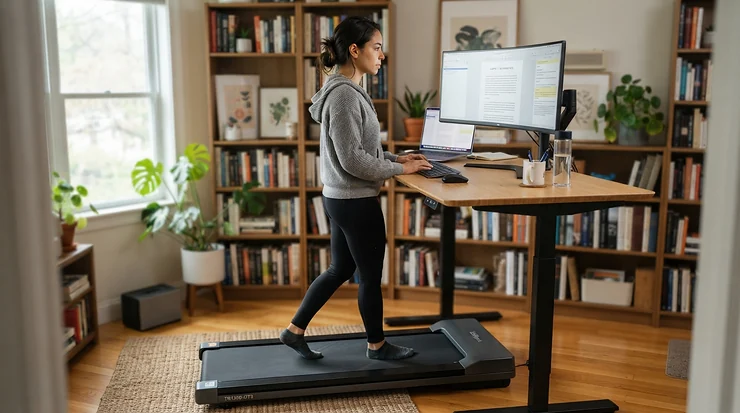
A treadmill for desk workers with back pain is a compact, low-speed walking machine, usually a flat walking pad that slides beneath a standing desk. It’s built to replace long stretches of sitting with gentle steps. The best ones combine a wide belt, a cushioned deck, slow speeds around 1-2 mph, and a stable frame that keeps your spine calm instead of jostled.
Why bother? Because movement, even unglamorous movement, matters. The World Health Organization’s 2020 guidelines urge adults to limit sedentary time and swap it for activity of any intensity, slow walking included. Notice what that doesn’t say. It doesn’t demand a marathon. It asks you to stop being a statue.
Here’s how this guide works. I’ve pulled together published specs and testing notes from outlets such as Consumer Reports, Garage Gym Reviews, and Tom’s Guide. Then I layered on analysis of what those numbers mean for a sore lower back. I haven’t personally used any of these machines, and I won’t pretend otherwise. I also skip quoting Amazon star ratings, because they shift daily. Instead, you’ll see the themes reviewers keep repeating. Prices appear as ranges only, so check current pricing before you buy.
Ahead: a quick comparison, seven detailed picks, setup and safety guidance, and a look at ergonomic workstations. Grab a coffee. Then stand up. Seriously.
Quick Comparison: Treadmill for Desk Workers With Back Pain at a Glance
| Product | Key Dimensions | Top Speed | Max User Weight | Price Range | Best For |
|---|---|---|---|---|---|
| DeerRun Q1 Mini | Unit 43 × 20 × 4 in | ~3.8 mph | 300 lb | ~$150-$270 | Tight budgets, shorter walkers |
| WalkingPad Z1 | Belt ~47.6 × 15.8 in | ~3.7-4 mph | 242 lb | ~$300-$400 | Small spaces, daily folding |
| WalkingPad P1 | Belt 47.2 × 16.5 in | 3.75 mph | Check listing | ~$300-$500 | Slow-start walkers |
| WalkingPad A1 Pro | Belt 47.2 × 16.5 in | 3.7 mph | 300 lb (variant) | ~$530-$600 | Heavier users who want a fold |
| LifeSpan TR1200-GlowUp | Deck 50 × 20 in | ~4 mph | 350 lb | ~$1,000-$1,800 | Long-term, quiet daily use |
| UREVO Strol 2E | Deck 40 × 17 in | 7.6 mph | Check listing | Under $500 | Walk-and-jog flexibility |
| Bluefin Fitness Task 2.0 | Unit 64 × 27 × 6 in | 5 mph | 265 lb | ~$300 | Handlebar support |
Looking at the comparison above, the DeerRun Q1 Mini and WalkingPad Z1 win on budget and storage. Their belts are shorter or narrower than the sturdier options, though, and that trade-off matters when back pain makes stable footing non-negotiable. Buyers willing to spend more get real durability from the LifeSpan TR1200-GlowUp. The WalkingPad A1 Pro sits in the sweet spot for heavier users who still want a folding design. The UREVO Strol 2E and Bluefin Fitness Task 2.0 add speed and a handlebar, which are fun extras but don’t improve desk posture.
💬 Just one click — help others make better buying decisions too!😊
Top 7 Treadmills for Desk Workers With Back Pain: Expert Analysis
Each pick below gets the same treatment: the specs, what they mean for your spine, what reviewers keep saying, and an honest value verdict. Think of it as a spec sheet with opinions.
1. DeerRun Q1 Mini — cheapest way to start walking
The DeerRun Q1 Mini makes the entry ticket almost embarrassingly low. It measures about 43 × 20 × 4 inches, weighs roughly 42 pounds, and tops out near 3.8 mph. That’s plenty, since most people settle around 1-2 mph for typing. The catch is the short belt: Tom’s Guide found it comfortable mainly for people under about 5’5″.
For back pain, a belt that’s too short forces a clipped stride. A clipped stride tends to make you hover at the front edge or hunch forward, which is exactly the posture you’re escaping. If you’re shorter, budget-minded, and curious whether walking while working suits you, this is the low-risk experiment. Tom’s Guide reported it still performing after 90 days with only occasional belt lubrication, while calling the companion app unexciting.
Pros:
- ✅ Very low entry price for a working walking pad
- ✅ Remote and simple screen make daily use easy
- ✅ 300-lb capacity plus transport wheels
Cons:
- ❌ Short belt punishes taller walkers
- ❌ No folding design and no incline
Expect roughly $150-$270 depending on promotions. That’s strong value if the belt fits you and poor value if it doesn’t.
2. WalkingPad Z1 — folds in half, vanishes into a closet
The WalkingPad Z1 is the pick for people whose “home office” is also a bedroom, a dining room, or all three. Unfolded, it runs about 56 × 22 × 4 inches with a walking area near 47.6 × 15.8 inches. It folds to roughly 36 × 25 × 8 inches and supports up to 242 pounds. Speeds run from about 1 to 4 mph.
The long belt suits a natural stride. The width sits at or just under the 16-inch mark Consumer Reports treats as narrow on standard treadmills, so wider-framed walkers should be cautious. Folding is a genuine ergonomic feature here, because a machine you’ll actually deploy beats a better one you dread dragging out. Tom’s Guide’s 90-day test found no visible wear and comfortable walking. It also flagged rising noise around the three-hour mark, belt slippage when folded, a short power cord, and a low profile that suits hard floors best.
Pros:
- ✅ Folds flat for easy storage
- ✅ Long belt supports a natural stride
- ✅ Comfortable, holds up in extended testing
Cons:
- ❌ Belt width is on the narrow side
- ❌ Noise creeps up after hours of use
Typical pricing lands around $300-$400. That’s solid value for renters and shared spaces.
3. WalkingPad P1 — proven daily driver with a long track record
The WalkingPad P1 has been the workhorse recommendation for years. Garage Gym Reviews rated it 4.1 out of 5 and named it best overall. It offers a 47.2 × 16.5-inch belt, a 0.5-3.75 mph speed range, and a folding design. A GGR tester reported using theirs daily for two years and still getting their money’s worth, which is exactly the sort of durability story you want.
That 0.5 mph floor is useful on flare-up days when all you want is a gentle shuffle. Consumer Reports warns that advertised minimum speeds don’t always match measured speeds across this category, so treat the claim as a starting point rather than a guarantee. Tom’s Guide has since crowned the WalkingPad Z1 its best-value WalkingPad, partly because the WalkingPad P1 lacks a built-in display. If you don’t mind checking stats on your phone, the wider belt is the real prize.
Pros:
- ✅ Slow 0.5 mph starting speed
- ✅ 16.5-inch belt is roomier than the WalkingPad Z1
- ✅ Folds away between sessions
Cons:
- ❌ No built-in display
- ❌ One-year warranty only
Pricing generally runs about $300-$500 depending on retailer and promotions. It’s good value if you find it near the low end.
4. WalkingPad A1 Pro — built for heavier walkers
The WalkingPad A1 Pro exists for one reason: capacity. Sold in a 300-lb version (a 231-lb variant also exists, so confirm which you’re buying), it pairs a 47.2 × 16.5-inch belt with a 1.25 HP brushless motor and a 3.7 mph top speed. It weighs roughly 62 pounds, folds to about 5 inches tall, and includes FootSense automatic speed control.
Weight headroom matters more than it sounds. A machine running near its limit tends to run hotter and wear faster, and instability is the last thing you want with a cranky back. One reviewer who weighs 300 pounds said the belt didn’t feel weak, yet another advises users above roughly 250 pounds who walk for hours daily to consider larger LifeSpan-style machines. Reviewers also note the auto-speed feature works best on hard floors and can be inconsistent on carpet.
Pros:
- ✅ Highest capacity in the folding WalkingPad lineup
- ✅ Quiet brushless motor
- ✅ Folds to about 5 inches
Cons:
- ❌ Costs noticeably more than the WalkingPad Z1
- ❌ Short return window on the manufacturer’s site
Expect roughly $530-$600. It’s fair value for heavier users, and overkill for everyone else.
5. LifeSpan TR1200-GlowUp — the quiet, sturdy office workhorse
The LifeSpan TR1200-GlowUp is the “buy once, cry once” option. It packs a 2.25 HP motor, a roughly 4 mph top speed, and a 50 × 20-inch deck. The frame carries a 10-year warranty, with 2 years on parts and 1 on labor. It supports 350 pounds and uses six shock absorbers under the belt. Its 4.6-inch step-up height barely eats into your standing desk’s range.
That width keeps your feet centered so your torso stays square, and cushioning takes the edge off heel strike. That’s my reasoning rather than a clinical claim, but Live Science’s reviewers reported their knees still felt fresh after hours of desk walking. The downsides are heft (about 114-119 pounds) and price. Consumer Reports also noted that one LifeSpan under-desk unit arrived damaged, though the issue was resolved after sending photos and video.
Pros:
- ✅ Wide 20-inch belt with strong shock absorption
- ✅ 350-lb capacity and 10-year frame warranty
- ✅ Quiet motor suits calls and shared offices
Cons:
- ❌ Heavy and bulky to relocate
- ❌ Pricey, with a basic console
Pricing ranges from roughly $1,000-$1,800 depending on configuration and retailer. Spread across years of daily use, it can be the best long-term value on this list.
6. UREVO Strol 2E — jog-capable with a fold-down handlebar
The UREVO Strol 2E is the “one machine, two moods” pick. It covers 0.6-7.6 mph on a 40 × 17-inch deck and includes a handlebar that folds down for desk use. Garage Gym Reviews called it the best foldable under-desk option and noted the price stays under $500. The warranty is one year.
Here’s the honest catch. GGR’s own scoring rubric prefers decks around 50 inches long, and this one is 40. For a tall walker with a sensitive back, that shorter deck can compress your stride. The handlebar helps if you use the machine away from your desk, but it’s no help while typing. Consumer Reports also cautions that walking pads are primarily designed for walking, not running, so don’t treat that 7.6 mph ceiling as a promise of gym-grade durability.
Pros:
- ✅ Speed headroom for occasional brisk sessions
- ✅ Folding handlebar adds stability and storage
- ✅ Priced under $500
Cons:
- ❌ Deck is only 40 inches long
- ❌ One-year warranty
It’s decent value for shorter walkers who want flexibility, and a compromise for everyone else.
7. Bluefin Fitness Task 2.0 — handlebar support for non-standing-desk setups
The Bluefin Fitness Task 2.0 is the odd one out, and deliberately so. It’s larger at about 64 × 27 × 6 inches and 68 pounds. It supports 265 pounds, reaches 5 mph, and includes a small handlebar, Bluetooth speakers, and six preset programs. Tom’s Guide praised the quick setup and affordability.
The handlebar is the reason it’s here. If back pain makes you feel wobbly during flare-ups, a steadying grip is a legitimate safety feature. Consumer Reports does warn that handrails on some machines are short and flimsy, and can create a false sense of security. Tom’s Guide’s tester, at 5’2″, also tripped on the side panels once or twice while focused on her laptop, and called the belt narrow. Reviewers found the app glitchy and the presets confusing.
Pros:
- ✅ Handlebar for extra steadiness
- ✅ 5 mph top speed and built-in speakers
- ✅ Quick, tool-free setup
Cons:
- ❌ Narrow belt invites side-panel stumbles
- ❌ Bulkier and heavier than folding rivals
Pricing sits around $300, based on one reviewer’s comparison with a $600 rival. It’s good value for people who want a handrail.
How the Seven Compare on Back-Friendly Features
| Product | Strength | Watch-Out | Warranty Note | Best For |
|---|---|---|---|---|
| DeerRun Q1 Mini | Price and simplicity | Short belt | Verify terms | Budget starters |
| WalkingPad Z1 | Fold and belt length | Narrow width | Verify terms | Small homes |
| WalkingPad P1 | Track record, 0.5 mph floor | No display | 1 year | Gentle-pace walkers |
| WalkingPad A1 Pro | Capacity | Premium price | Short return window | Heavier users |
| LifeSpan TR1200-GlowUp | Sturdiness, quiet | Weight, cost | 10-yr frame | Long-term users |
| UREVO Strol 2E | Speed range, handlebar | Short deck | 1 year | Occasional joggers |
| Bluefin Fitness Task 2.0 | Handlebar | Narrow belt | Verify terms | Balance-conscious users |
The table shows a pattern: nearly everything affordable trades away belt width, belt length, or warranty length. If back pain is your priority, spend your money on the belt and the frame rather than on apps, speakers, or top speed. The LifeSpan TR1200-GlowUp and WalkingPad P1 cover those bases best, and the WalkingPad A1 Pro covers heavier users.
Your First 30 Days: A Practical Setup and Walking Guide
Buying a treadmill for desk workers with back pain is the easy part. Using it without irritating your spine takes a plan. Borrow the logic of progression: start small, build slowly, and let your back set the pace.
Days 1-7: Two or three 10-minute sessions at a comfortable crawl, roughly 1 mph. Tom’s Guide suggests newer users limit themselves to about 30-minute spells, and starting shorter is even safer.
Weeks 2-3: Stretch sessions to 15-20 minutes, and try walking during calls or reading tasks. Match tasks to walking: email, reading, and calls work well, while spreadsheets and design work belong in a paused or standing position.
Week 4: Build toward 30-minute blocks if your back stays calm.
Setup essentials:
- Follow the manufacturer’s lubrication schedule and keep the belt centered.
- Clip on the safety key if one is included, and keep the remote somewhere obvious. It may be the only way to control the machine.
- Wear supportive shoes, and never let the belt run empty.
Common first-month mistakes include starting too fast, staring down at the belt, gripping the desk edge, and treating pain as something to push through. Stop if pain sharpens, radiates down a leg, or brings numbness.
Real-World Scenarios: Which Treadmill Fits Which Desk Worker
Specs are abstract. Desks are not. Here are three profiles that show how the choices play out.
The tall remote analyst. A 6’1″ employee works eight hours at home with a budget near $1,000. Belt length is the deciding factor, so the LifeSpan TR1200-GlowUp with its 50-inch deck is the natural match. The WalkingPad P1 is the cheaper alternative if the budget shrinks.
The apartment renter. A shared 600-square-foot space with a $300-$400 budget means storage drives everything. The WalkingPad Z1 folds away in seconds, and the trade-off is a narrower belt. It suits light daily use of 60-90 minutes.
The heavier user. Someone around 270-280 pounds needs headroom above all. The WalkingPad A1 Pro in its 300-lb version fits mid-range budgets. The LifeSpan TR1200-GlowUp with its 350-lb rating is the better choice for many hours a day. A shorter, lighter walker starting out on a tight budget could try the DeerRun Q1 Mini instead.
Each profile weighs budget, room, and frequency of use, and those three factors decide more than any spec sheet.
✨ Ready to Move More at Your Desk?
🔍 Take your workday comfort to the next level with these carefully researched picks. Click any highlighted product name to check current pricing and availability. These tools can help you build a steadier, more comfortable routine for your back!
Sedentary Lifestyle Risks: Why Sitting All Day Bites Back
Let’s be precise about sedentary lifestyle risks, because the science is more nuanced than headlines suggest. The WHO’s guideline review found moderate-certainty evidence that sedentary behavior’s link to all-cause and cardiovascular mortality varies with how much physical activity you do. The same review said the evidence is insufficient to name an exact daily sitting threshold. Translation: sitting isn’t a cliff, and activity offsets some of the damage.
OSHA’s workstation guidance adds a practical point. Even with perfect posture, staying in one position or sitting still for long periods isn’t healthy, so change positions often. That fits how back pain behaves: static loading tends to stiffen you, and movement tends to loosen you up.
Regular moderate activity is also linked, according to CardioSmart, to better outcomes for mortality, heart disease, blood pressure, type 2 diabetes, mood, and sleep. Adults are advised to aim for 150-300 minutes of moderate activity weekly. One honest caveat: desk walking at 1-2 mph is closer to light activity. It fills sitting time rather than replacing a workout, which is still a meaningful win.
Treadmill for Sedentary Lifestyle Back Pain: What the Research Does (and Doesn’t) Show
The strongest recent evidence is the WalkBack trial in The Lancet. It followed 701 adults who had recently recovered from non-specific low back pain. Half received an individualized, progressive walking and education program guided by physiotherapists, building toward roughly 30 minutes of walking five times a week over six months. Summaries report that the walking group went a median of 208 days before an activity-limiting recurrence, versus 112 days for the control group. Recurrence is common, with about 70% of people relapsing within a year.
Now the caveats, because honesty beats hype. Participants had already recovered, the walking wasn’t done at a desk, and the program was supervised. It doesn’t prove a treadmill desk treats acute pain. What it does support is the logic behind choosing a treadmill for sedentary lifestyle back pain: regular, gentle, progressive walking is a sensible habit worth building.
Treadmill-desk research is smaller. A 2021 systematic review of 13 studies, cited by Tom’s Guide, found treadmill desks raised energy expenditure and cut sitting time. That’s useful, though it isn’t proof of back-pain relief. Talk to a clinician if your pain is severe, recent, or worsening.
How to Choose a Treadmill for Desk Workers With Back Pain
Short answer: choose a flat, stable walking pad with a belt at least 16 inches wide and about 47 inches long, a weight rating well above your own, and a warranty longer than one year.
- Match belt length to your stride. Taller walkers should look for roughly 47-50 inches, since short decks shorten your steps.
- Check belt width. Consumer Reports found belts in this category ranging from 15 to 19.75 inches, and treats 16 inches as narrow on standard treadmills. Wider is steadier.
- Demand weight headroom. Choose a rating comfortably above your body weight, because machines near their limits wear faster.
- Look for smooth speed changes. CR flagged belts that jerk when speed changes and measured speeds that didn’t match displays.
- Prioritize safety behavior. Ideally the belt runs only when you’re on it, and stops gradually rather than slamming.
- Value shock absorption and quiet. Cushioning reduces impact, and quieter motors keep you using it.
- Read the warranty. CR notes most of these products carry one year or less, so longer coverage is a meaningful upgrade.
Ergonomic Workstations: Pairing Your Treadmill With the Right Desk Setup
A great treadmill on a badly set desk is like a fancy tire on a bent axle. Building ergonomic workstations around your walking pad matters just as much as the machine itself. OSHA’s computer workstation guidance describes neutral positions for sitting and standing, and it advises varying your posture through the day.
Start with height. Your desk must clear your elbow height when you’re standing on the treadmill deck, so add the step-up height. The LifeSpan TR1200-GlowUp adds just 4.6 inches, while thicker machines eat more of the range. Tom’s Guide recommends pairing a walking pad with a standing desk so you don’t slouch or bend to reach your work.
Then tune the details. Keep the monitor’s top at or below your eye line so you’re not tilting your head back. Hold elbows close and roughly at keyboard height, and keep wrists straight. If your desk can’t reach the right height, that’s a sign to skip the treadmill or adjust the desk first.
Under-Desk Treadmills vs Traditional Treadmills vs Under-Desk Ellipticals
| Feature | Under-Desk Treadmills | Traditional Treadmills | Under-Desk Ellipticals | Best For |
|---|---|---|---|---|
| Speed | Walking pace, ~4 mph typical | 8-12 mph typical | Pedal pace | Under-desk treadmills: desk walking |
| Footprint | Up to ~60 × 28 in | Larger | ~23 × 17.5 in | Ellipticals: small spaces |
| Desk needed | Standing desk | Not applicable | Standard desk | Ellipticals: seated workers |
| Cost | ~$150-$1,400 (CR range) | Higher | ~$57-$250 (CR range) | Ellipticals: tight budgets |
Consumer Reports says the choice between under-desk treadmills and ellipticals comes down to preference. Ellipticals are cheaper, quieter, and easier on video calls because your upper body stays still. A CR-quoted physician also said standing and walking likely recruit more muscle groups than sitting-based options.
For back pain specifically, treadmills let you stand upright, while ellipticals let you stay seated and stable. If your back tolerates standing well, a treadmill is a great fit. If standing aggravates it, an elliptical may be the smarter first step. Traditional treadmills win for running, but they don’t tuck under a desk.
Walking Treadmill for Office Workers: Tailored Advice by Work Style
A walking treadmill for office workers isn’t one-size-fits-all, because jobs differ.
Call-Heavy Managers
Meetings reward slow, quiet, steady walking. The LifeSpan TR1200-GlowUp is the quietest pick, and Consumer Reports notes that treadmill movement is more visible on video calls than elliptical movement.
Writers and Analysts
Precision work is where walking gets awkward. Use intervals: walk while reading or brainstorming, then pause the belt for detail work.
Shared or Open-Plan Offices
Noise and weight matter. Sturdier machines like the LifeSpan TR1200-GlowUp hold up to communal use, while foldables like the WalkingPad Z1 are better for one-person setups.
Hybrid Workers
If you’re home two or three days a week, folding wins. The WalkingPad P1 and WalkingPad Z1 both tuck away.
Users Who Feel Unsteady
A handlebar helps, but treat it as a supplement to balance and clinical guidance, not a replacement. The Bluefin Fitness Task 2.0 and UREVO Strol 2E both include one.
Features That Actually Matter (And Those That Don’t)
What matters: belt width and length, consistent speed, shock absorption, a stable frame, and predictable safety behavior. These directly affect how your back feels after two hours.
What doesn’t: top speed. For desk work you’ll rarely exceed 2 mph, so the UREVO Strol 2E‘s 7.6 mph is a bonus rather than a benefit. Apps are also mostly window dressing. Tom’s Guide described the apps on several models as fiddly or glitchy, and reviewers of the DeerRun Q1 Mini said they stick with standard mode.
Take horsepower numbers with salt. Sources list the WalkingPad Z1 with different motor ratings, so treat HP as a marketing number and lean on real-world reviewer notes about noise and smoothness.
Nice-to-haves: built-in speakers on the Bluefin Fitness Task 2.0, a display, and app tracking. Enjoy them, but don’t pay extra for them if that money could buy a wider belt.
Safety, Long-Term Cost, and Maintenance
Safety first, because this category has real problems. Consumer Reports’ under-desk treadmill testing found serious safety issues in some models. A belt tore during durability testing, safety keys often made belts stop abruptly, and some machines ran without a load or at speeds that didn’t match the display. CR also cited a Consumer Product Safety Commission report of a head injury after an under-desk treadmill suddenly stopped. Its testers called many inexpensive models “probably not worth the risk,” so favor established brands with clear warranties.
Maintenance is refreshingly simple. Tom’s Guide found the DeerRun Q1 Mini needed lubrication only a couple of times in 90 days, plus occasional wipe-downs. Follow your manufacturer’s schedule and keep the belt centered.
For cost, do the arithmetic. A machine in the $500 range used 250 days a year for three years works out to under a dollar per use-day. A $1,000+ machine like the LifeSpan TR1200-GlowUp needs longer service to match that, which is where the frame warranty helps.
One last note: this isn’t medical advice. See a clinician promptly if pain follows an injury or comes with numbness, weakness, or fever.
FAQ
❓ How long should I walk on an under-desk treadmill when my back hurts?
❓ Is a walking pad better than a standing desk alone for lower back pain?
❓ Can a walking treadmill for office workers go on carpet?
❓ Are under-desk treadmills safe for users over 250 pounds?
❓ Do I still need ergonomic workstations if I walk while I work?
Conclusion
A treadmill for desk workers with back pain isn’t a magic wand. It’s a habit machine. The research on walking and low back pain recurrence is encouraging, the guidance on sedentary lifestyle risks points toward more movement, and the right walking pad makes that movement almost effortless. But the winning ingredient is consistency: modest, comfortable, progressive walking that your back can tolerate.
If you want the short version, here it is. Pick the LifeSpan TR1200-GlowUp when durability, a wide belt, and quiet matter most. Choose the WalkingPad A1 Pro for heavier users who want a fold, and the WalkingPad P1 for a proven, gentle-speed performer. The WalkingPad Z1 suits small spaces, the DeerRun Q1 Mini suits tight budgets and shorter walkers, and the UREVO Strol 2E and Bluefin Fitness Task 2.0 cover jogging flexibility and handlebar support. Whatever you choose, build it into a proper ergonomic workstation, start slow, and check current prices before buying.
Recommended for You
- Treadmill Under $600 For Back Pain: 7 Picks That Won’t Wreck You (2026)
- 7 Best Cushioned Treadmills For Spinal Health In 2026
- Treadmill With Shock Absorption For Herniated Disc: 7 Top Picks 2026
Disclaimer: This article contains affiliate links. As an Amazon Associate, I earn from qualifying purchases. If you purchase products through these links, we may earn a small commission at no additional cost to you.
✨ Found this helpful? Share it with your friends! 💬🤗
