In This Article
You already know the setup. Coffee goes cold before you finish it. The chair you bought “for your back” now feels like punishment. You look up from the screen and three hours have disappeared, your hips ache, and your step count for the day is somewhere between embarrassing and medically alarming.
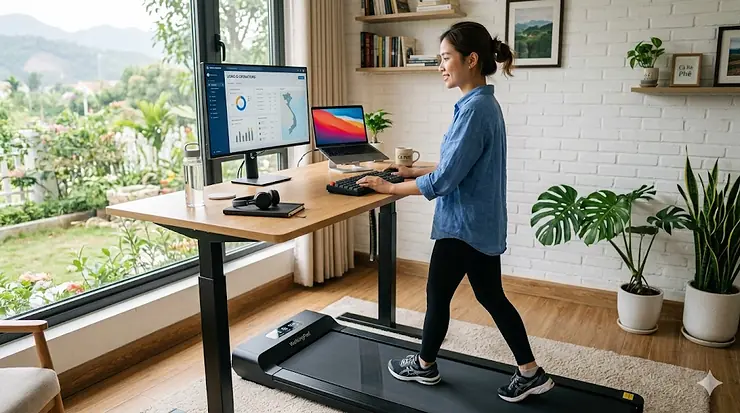
Here’s the brutal truth: the average remote worker sits for over nine hours a day — more than office workers who at least have to walk to the conference room. And research published in The Lancet Public Health (2025) confirms that prolonged sedentary behavior is directly linked to elevated risks of cardiovascular disease, metabolic disorders, and premature mortality. “Sitting is the new smoking” isn’t a wellness influencer’s hot take anymore. It’s peer-reviewed science.
So what do you do when your job demands eight hours of screen time, but your body demands movement? You get yourself the best treadmill desk for home office use — and you stop treating your work day and your health like two separate appointments.
A treadmill desk for home office setups is exactly what it sounds like: a compact, low-speed walking treadmill that slides under a standing desk, letting you rack up miles while you answer emails, join Zoom calls, and review that report that was supposed to be done yesterday. Most are designed to run silently between 0.6 and 4 mph — brisk enough to keep your blood moving, slow enough that you can actually type in a straight line.
A Mayo Clinic randomized study found that active workstations — including walking pads — reduced sedentary time and improved cognitive performance without reducing job performance. Not a trade-off. An upgrade.
I’ve dug deep into the current Amazon market, cross-referenced real customer feedback, and applied some hard-earned judgment to put together this guide. Whether you’re spending $150 or $1,200, these are the seven machines worth your attention in 2026.
Quick Comparison Table: 7 Best Treadmill Desk for Home Office Options
| Product | Motor | Max Speed | Weight Capacity | Belt Size | Price Range | Best For |
|---|---|---|---|---|---|---|
| LifeSpan TR1200-DT3 GlowUp | 2.25 HP | 4 MPH | 350 lbs | 50″ × 20″ | $999–$1,199 | Power users, heavier walkers |
| WalkingPad A1 Pro | 1 HP brushless | 3.7 MPH | 300 lbs | 47″ × 16″ | $330–$380 | Space-constrained WFH setups |
| UREVO Strol 2E Smart | 2.5 HP | 7.6 MPH | 265 lbs | 47″ × 17″ | $250–$320 | Dual-use: walking + light jogging |
| Superun Walking Pad BA10 | 2.5 HP | 3.7 MPH (walk) | 300 lbs | 47″ × 17″ | $200–$280 | Mid-budget, incline seekers |
| KASSADIN 2026 Upgrade | 3.0 HP | 7.6 MPH | 350 lbs | 48″ × 17″ | $280–$360 | Heavy users needing handle bar |
| FOUSAE Walking Pad | 2.75 HP brushless | 6.2 MPH | 350 lbs | 47″ × 17″ | $260–$340 | HIIT + desk work combo users |
| Yagud Walking Pad | 2.0 HP | 4.0 MPH | 220 lbs | 44″ × 16″ | $140–$180 | First-time buyers, tight budgets |
Reading the numbers: The LifeSpan TR1200-DT3 GlowUp dominates on build quality and belt real estate, which matters more than you’d think — a narrow belt creates unconscious stress as you walk. For most WFH users though, the KASSADIN 2026 or FOUSAE hit a compelling middle ground: serious motor power, high weight capacity, and prices that won’t require renegotiating your mortgage. The Yagud earns its spot by doing one thing well: getting you moving for the least amount of money.
💬 Just one click — help others make better buying decisions too! 😊
Top 7 Treadmill Desk for Home Office Picks: Expert Analysis
1. LifeSpan TR1200-DT3 GlowUp Under Desk Treadmill — The Gold Standard
If there’s a treadmill desk that’s achieved cult status in the WFH world, it’s the LifeSpan TR1200-DT3 GlowUp. Used in the offices of Google, Tesla, and Microsoft, it’s the machine against which every other walking treadmill gets measured — and most fall short.
Key specs, with real-world meaning: The 2.25 HP motor tops out at 4 MPH, which sounds modest until you realize that anything faster and you’ll be jogging, sweating through your shirt, and absolutely not focusing on that spreadsheet. The 50″ × 20″ belt is genuinely roomy — the extra width compared to budget models means you walk naturally instead of performing a tightrope act. Six independent compression shock absorbers soften each step, which matters enormously if you wear business shoes at your desk rather than padded running sneakers. The Bluetooth-enabled console clips to your desk surface, keeping speed controls at eye level rather than buried down by your feet where you can’t see them.
What most buyers overlook about this model: the TR1200 ships fully assembled. You plug it in and walk. That sounds trivial until you’ve spent 90 minutes decoding poorly translated assembly instructions at 11 pm on a Tuesday.
Who this is for: Power users who will log 3–6 hours per day on the machine. Heavier walkers up to 350 lbs. Anyone who works in a shared home office environment and needs near-silent operation — the TR1200 is quiet enough for video calls without muting. The 10-year frame warranty is the longest in this category by a wide margin, making the premium price a rational long-term investment.
Customer feedback: Reviewers consistently praise the smooth belt transition and the absence of worrying noises. A common note: “I’ve been walking on it daily for three months with zero issues” appears almost verbatim across multiple verified reviews.
✅ Near-silent motor rated for shared workspaces
✅ Fully assembled out of the box — no setup headaches
✅ Industry-leading 10-year frame / 2-year parts warranty
❌ Premium price — the highest on this list
❌ No incline (intentional — ergonomists recommend flat surface for desk work, but worth noting)
Price range: $999–$1,199 | Worth every penny for daily heavy use.
2. WalkingPad A1 Pro Foldable Under Desk Treadmill — The Space Saver
Walk into a home office where every square foot costs real money — a Brooklyn apartment, a converted guest bedroom, a studio in Austin — and you understand why the WalkingPad A1 Pro exists. This is the machine for people who want a treadmill desk without surrendering half their living space.
Key specs: The patented 180-degree fold collapses the A1 Pro to the size of a carry-on suitcase, sliding under most beds or couches with room to spare. The 1 HP brushless motor tops at 3.7 MPH — enough for a purposeful walking pace, not enough to confuse your legs into thinking you’re doing cardio (which is the point). At 300 lbs weight capacity, it handles most users comfortably. The auto-sensing speed control adjusts based on where your feet land on the belt, which sounds gimmicky but actually works reasonably well for casual use.
What the spec sheet won’t tell you: the fold mechanism makes a loud snap when deployed. Not machine-breaking, but potentially startling in a shared space. Additionally, the 16″ belt width is narrower than the gold-standard 20″ — fine for deliberate slow walking, but less forgiving if you tend to drift when distracted.
Who this is for: Apartment dwellers and minimalists who need to put the treadmill away completely when not in use. People who primarily want a 1.5–2 MPH email-answering pace. Not recommended for users over 200 lbs who plan to use it for hours daily — the 1 HP motor will feel the load over time.
Customer feedback: Users love the storage solution and the quiet operation. Most complaints center on the belt width being tight for larger shoe sizes.
✅ Folds to suitcase size with transport wheels
✅ Brushless motor for longevity and quiet operation
✅ Simple setup — unfold, plug in, walk
❌ 1 HP motor limits long daily sessions for heavier users
❌ 16″ belt width feels cramped for anyone with a long stride
Price range: $330–$380 | Excellent value for space-first buyers.
3. UREVO Strol 2E Smart 2-in-1 Folding Treadmill — The Versatile Multitasker
UREVO has been quietly building a reputation as the brand that delivers features above its price bracket, and the Strol 2E Smart is probably their best argument yet. This is a 2-in-1 machine: fold down the safety handle and you have a classic under-desk walking pad; unfold it and you’ve got a compact jogging treadmill for after-hours workouts.
Key specs: The 2.5 HP motor pushes up to 7.6 MPH — that’s genuine light jogging speed, not marketing math. The dual LED display shows speed, distance, calories, and time simultaneously. Smart APP connectivity (works on iOS and Android) tracks workout history and lets you set speed intervals — handy if you want to toggle between desk-pace and a brisk afternoon session. The safety handle auto-stops the belt if you step off, which Consumer Reports has flagged as an important safety feature across this category.
The practical insight here: most people buy an under-desk treadmill intending to only walk while working, then six weeks later realize they also want to use it for actual cardio. The UREVO Strol 2E smart-proofs that scenario. You don’t have to buy two machines. The dual LED display is also genuinely better than most — bright, readable at standing desk height without squinting.
Who this is for: WFH professionals under 40 who want one machine that handles both desk-walking and fitness sessions. Apartments where a separate exercise treadmill isn’t possible. People who get bored easily — the app-connected features keep things interesting.
✅ Dual-use: under-desk walking + standalone running up to 7.6 MPH
✅ App connectivity with workout tracking
✅ Safety auto-stop handle folds neatly
❌ 265 lb weight limit is lower than competitors at similar prices
❌ Handles take a moment to fold/unfold between modes
Price range: $250–$320 | Exceptional versatility per dollar spent.
4. Superun Walking Pad BA10 (6% Incline, 3-in-1) — The Incline Innovator
Here’s a controversial take: most ergonomists say incline is bad for under-desk use because it throws your posture off. That’s true above 3%. But a gentle 6% incline, used strategically — say, for 20-minute walking intervals between seated work — is one of the most efficient ways to spike calorie burn without changing speed. The Superun BA10 understands this assignment.
Key specs: The 2.5 HP motor handles 0.6 to 3.7 MPH in desk mode and up to 7.5 MPH in exercise mode (3-in-1 mode includes a handle bar configuration). The 6% incline kicks the metabolic rate up noticeably — walking at 2 MPH on a 6% grade burns roughly the same calories as flat walking at 3 MPH. The 300 lb weight capacity is solid. The app connects to a fitness tracking platform with multiplayer online running challenges, which sounds ridiculous until you realize it keeps a lot of users actually using the machine.
What makes the Superun BA10 stand out in a crowded mid-price market is the remote control: it’s white (easy to find on a desk), works reliably from across the room, and doesn’t require pairing every time. Reviewers on Amazon UK consistently note how quiet the cushioned belt feels, with multiple buyers highlighting it as suitable for video calls.
Who this is for: Users who want to maximize calorie burn during short walking intervals rather than sustained low-intensity sessions. Fitness-minded WFH professionals who want occasional workout mode without a separate treadmill. Anyone motivated by gamification and community challenges.
✅ 6% incline adds metabolic intensity without speed increase
✅ Quiet, cushioned belt praised across verified reviews
✅ App includes multiplayer challenges for accountability
❌ Incline not ideal for hours of sustained desk work (use strategically)
❌ App features require a learning curve to maximize
Price range: $200–$280 | Strong value, especially for incline enthusiasts.
5. KASSADIN Walking Pad 2026 Upgrade (Handle Bar, 3.0 HP) — The Powerhouse for Heavy Users
KASSADIN launched their 2026 upgrade with one clear message: we’re building for people who weigh more and want more. The result is one of the most capable budget-premium walking pads on the market, and it’s currently sitting comfortably in Amazon’s Best Sellers in the treadmill category.
Key specs: The 3.0 HP motor is the strongest in this price range — period. It handles 350 lbs without strain and maintains consistent belt speed even under load, which cheaper motors simply cannot do (you feel belt slowdowns as a lurching sensation that ruins your walking rhythm). Speed range runs 0.6 to 7.6 MPH, meaning this machine doubles as a legitimate exercise treadmill. The adjustable handlebar is a significant addition: it stabilizes heavier users, allows for hand-free walking at higher speeds, and reduces fatigue during longer sessions.
The spec sheet won’t tell you that most “2-in-1” treadmills with handlebars feel rickety at jogging speeds. The KASSADIN 2026 doesn’t — the handlebar locks solidly and the frame absorbs vibration without creaking. This is what $50 more in engineering quality feels like compared to the generic-brand flood on Amazon.
Who this is for: Larger users (200–350 lbs) who need a machine that won’t labor under their weight. Users wanting both desk-mode walking and real exercise sessions. Anyone who values stability and prefers holding a handle while walking — common for people rehabbing lower back issues.
✅ 3.0 HP motor — handles 350 lbs without belt slowdown
✅ Secure handlebar adds stability for all user sizes
✅ 0.6–7.6 MPH range covers desk walking to jogging
❌ Handlebar adds bulk — less minimal aesthetic than walk-pad-only models
❌ Assembly required (30–45 minutes, though instructions are clear)
Price range: $280–$360 | Best-in-class power-to-price ratio for heavier users.
6. FOUSAE Walking Pad (2.75 HP Brushless, 10% Incline, 12 HIIT Programs) — The Feature Maximalist
If you’re the type who reads spec sheets the way some people read menus — savoring every detail — the FOUSAE Walking Pad will make you very happy. It packs more features into the $260–$340 range than any competitor currently on Amazon, and it mostly delivers on the promises.
Key specs: The 2.75 HP brushless motor is the key detail here. Brushless motors run quieter, last significantly longer, and require almost zero maintenance compared to brushed motors in similarly priced machines. The 10% incline is steep — far more than the Superun’s 6% — making it better suited for post-work fitness sessions than sustained desk walking at that grade. Twelve HIIT programs are pre-loaded, cycling through speed and incline variations automatically. The full-screen LED display (not just a small counter strip) shows all metrics at a glance. Weight capacity hits 350 lbs.
The practical distinction that matters: brushless motors in this price range typically appear in machines $100–$150 more expensive. FOUSAE appears to have made engineering trade-offs elsewhere (the frame is lighter) to deliver this motor at a competitive price. This machine will outlast most brushed-motor competitors at the same price point.
Who this is for: Productivity-obsessed users who want structured interval programs to maximize their walking minutes. People who treat the treadmill desk as both a work tool and a fitness tool in equal measure. Remote workers who are already tracking macros, sleep cycles, and productivity metrics — and want their treadmill to keep pace.
✅ Brushless motor = quieter + significantly longer lifespan
✅ 12 HIIT programs run automatically — no manual speed adjustments needed
✅ Full-screen display readable from standing desk height
❌ 10% incline makes extended desk-mode walking ergonomically challenging
❌ Lighter frame than premium options — not ideal for daily 5+ hour sessions
Price range: $260–$340 | Best long-term value for feature-seekers.
7. Yagud Walking Pad — The Smart Entry Point
Every category has a best budget option, and in the treadmill desk for home office category, the Yagud Walking Pad earns that title without embarrassing itself. It’s not trying to compete with the LifeSpan on durability or the KASSADIN on power. It’s trying to get you off the couch and walking for less than $180, and it succeeds at that specific job.
Key specs: A 2.0 HP motor handles 0.6 to 4.0 MPH — exactly the range you need for desk walking. The LED display tracks speed, distance, steps, and calories. Remote control is included. Maximum weight capacity of 220 lbs is the notable limitation here, along with a 44″ belt length that’s shorter than most competitors. At around 40 lbs, it moves easily on its transport wheels.
What buyers often miss: the Yagud is best treated as a starter treadmill desk. Buy it, use it for 60–90 days, figure out whether you actually want to walk while working (many people discover they don’t after the novelty wears off), and upgrade when you’re certain. Spending $1,200 on a LifeSpan when you haven’t tested the concept is a risky proposition. The Yagud removes that risk entirely.
Customer feedback: Users love the price point and the plug-and-play simplicity. The most common complaint: “I wish the belt were wider.” Noted.
✅ Under $180 — lowest barrier to entry on this list
✅ Remote control included — no bending down to adjust speed
✅ Lightweight and easy to move between rooms
❌ 220 lb weight limit excludes many users
❌ 44″ belt length is short — taller users (6’+) may feel cramped
Price range: $140–$180 | Ideal trial purchase before committing to premium.
How to Set Up Your Work From Home Treadmill Setup the Right Way
Buying the treadmill is the easy part. Setting up a WFH treadmill setup that you’ll actually stick with for more than two weeks? That requires a bit more thought.
Week one: start embarrassingly slow. Seriously. Most people climb onto their new treadmill desk, crank it to 2.5 MPH, and immediately discover they cannot type, think, and walk simultaneously at that speed. Start at 1.0–1.2 MPH. It feels almost stationary. That’s fine. Your hands need to learn that the ground is moving. Give yourself three to five days at low speed before pushing higher.
Desk height is non-negotiable. Your standing desk needs to accommodate the treadmill’s step-up height (typically 4–6 inches) plus your own standing height. If your desk doesn’t go high enough, you’ll hunch forward trying to reach the keyboard, defeating the entire purpose. Measure twice; order desk risers if needed.
The 20/20 rule for beginners: Walk 20 minutes on, sit 20 minutes off. Research from the British Journal of Sports Medicine recommends that desk-based workers accumulate at least 2 hours of standing and light walking during the workday — but trying to hit that on day one is a recipe for sore calves and a treadmill collecting dust. Build gradually. After two weeks, extend sessions by 10-minute increments.
Shoes matter more than you’d think. Clean indoor-only sneakers change the belt hygiene equation entirely — the amount of dust and grit that comes off outdoor shoes damages belts prematurely. Keep a dedicated pair of walking sneakers near the machine.
Cable management is your silent enemy. Laptop cables, phone chargers, headphone cords — all of them become tripping hazards the moment you add a moving belt to the equation. Before you walk for the first time, spend 15 minutes routing every cable up and away from the floor. Velcro cable ties cost $8 and will save you a genuinely frightening near-miss.
Lubricate the belt every 3 months. Most manufacturers include one silicone lubrication packet. After that, a $10 bottle of treadmill belt lubricant is all you need. Skipping this step is the #1 reason belts squeak and wear prematurely after 6 months.
Which Buyer Are You? A Real-World Scenario Guide
Abstract buying advice is less useful than recognizing yourself in a specific situation. Here are three profiles that map directly to products on this list.
The Committed Daily Walker: You work from home full-time, you’ve already got a standing desk, and your goal is to walk 2–3 hours during the workday, five days a week. You weigh 190 lbs. Budget isn’t the primary concern — reliability and noise level are.
Recommendation: LifeSpan TR1200-DT3 GlowUp. The 10-year frame warranty, near-silent motor, and 20″ wide belt justify the premium for daily heavy use. This machine will outlast your desk.
The Apartment Dweller: You rent a 650 sq ft apartment. You work from a corner desk setup and can’t permanently dedicate floor space to a treadmill. You want to get steps in during calls and store the machine completely when not in use.
Recommendation: WalkingPad A1 Pro. The 180-degree fold genuinely solves the storage problem. At 3.7 MPH max speed, it covers every speed you’ll realistically use at a desk.
The Budget-Curious Skeptic: You’ve read the research. You’re intrigued. But you’ve also bought a stationary bike that became an expensive clothes hanger, and you’re not ready to spend $1,000 on another “lifestyle upgrade” that might not stick.
Recommendation: Yagud Walking Pad. At under $180, it’s the lowest-risk entry point. Walk on it for two months. If you’re still using it enthusiastically by month three, that’s your signal to invest in a LifeSpan. If it becomes a dust collector, you’ve lost $180 — not $1,200.
How to Choose a Treadmill Desk for Home Office: 6 Criteria That Actually Matter
The marketing pages all say the same things — quiet, portable, easy to use. Here’s what to actually evaluate, ranked by importance.
1. Weight capacity vs. your actual weight (add 10%). If you weigh 200 lbs, don’t buy a machine rated for 220 lbs. The motor and belt wear faster when operating near capacity. Look for at least 20–25% headroom. At 200 lbs, the KASSADIN (350 lb capacity) is more appropriate than the Yagud (220 lb limit).
2. Belt width — minimum 17″, ideally 20″. A 16″ belt is survivable at 1.5 MPH. At 2.5 MPH, you’re consciously correcting your gait to stay on it. This creates fatigue and mild anxiety that distracts from work. The extra 4 inches on the LifeSpan’s 20″ belt genuinely feel different.
3. Motor type: brushless vs. brushed. Brushless motors (found on the FOUSAE and WalkingPad A1 Pro) last longer, run quieter, and require less maintenance. For occasional users, a brushed motor is fine. For daily 2+ hour sessions, brushless pays for itself in longevity.
4. Noise level — measure in real conditions, not lab conditions. Most brands quote decibel ratings in ideal laboratory settings. According to ergonomics guidelines, office environments should stay under 55 dB for cognitive work. The LifeSpan TR1200 and Superun BA10 have both been independently measured at under 50 dB at walking speeds. Budget models can spike to 65+ dB under load.
5. Video call stability. This is the hidden test nobody talks about. At 1.5–2 MPH, do you sound like you’re walking? Get someone on a call and try it before your first real meeting. Models with better shock absorption (LifeSpan’s 6-point system, FOUSAE’s dual-layer design) create less audible footfall.
6. Warranty. Budget models often come with 90-day warranties. The LifeSpan offers 10 years on the frame. This gap reflects real build quality differences. For a machine you’ll use daily, the warranty is a proxy for engineering confidence.
Common Mistakes When Buying a WFH Treadmill Desk
Learning from other people’s expensive errors saves you real money.
Mistake 1: Buying before checking desk compatibility. The treadmill goes under the desk. That means your standing desk must go higher than normal. Many standing desks max out at 47″–49″ — enough for most users when flat on the floor, but not when a treadmill adds 5″ of platform height. Measure your desk’s maximum height minus the treadmill’s step-up height. That’s your usable standing height. If it’s less than your comfortable standing height, you need a taller desk first.
Mistake 2: Buying based on running speed specs you’ll never use. The KASSADIN goes to 7.6 MPH. Wonderful. You will never walk at 7.6 MPH while typing an email. Don’t pay a premium for running speed you won’t use in desk mode. The functional speed range for a treadmill desk for home office is 1.0–3.0 MPH. Everything above that is fitness bonus territory.
Mistake 3: Ignoring the noise during calls. Test your treadmill at your actual working speed (probably 1.5–2 MPH) and ask someone to listen to you on a video call. Some models with good decibel ratings still produce an audible rhythm through the floor. This is especially problematic in apartments with downstairs neighbors.
Mistake 4: Not budgeting for a standing desk. A treadmill desk for home office use requires a height-adjustable desk. Using a fixed-height desk that doesn’t go high enough means hunching forward — worse for your posture than sitting. If you don’t have a standing desk, budget for one alongside the treadmill. Entry-level standing desks start around $200–$300.
Mistake 5: Setting the speed too high too fast. The number of Amazon reviews that say “I returned it after a week because I couldn’t work while walking” almost always belong to people who started at 2.5+ MPH. That’s too fast for simultaneous cognitive work in the first month. Start at 1.0 MPH. Build over weeks.
Treadmill Desk vs. Standing Desk: Which Actually Improves Your Health More?
This is a question worth answering with data rather than enthusiasm. Research reviewed in ScienceDirect (2025) found that sit-to-stand workstations reduce sedentary time by up to 75 minutes per day — a real improvement. But they don’t significantly increase physical activity intensity. Standing is not exercise; it’s just less harmful than sitting.
A walking treadmill desk, by contrast, actively increases step count and light physical activity. The same research found that self-monitoring combined with movement strategies yielded average gains of over 1,000 steps per day.
| Feature | Standing Desk | Treadmill Desk for Home Office |
|---|---|---|
| Reduces sedentary time | ✅ Yes (up to 75 min/day) | ✅ Yes (more effectively) |
| Increases physical activity | ❌ No | ✅ Yes |
| Improves cognitive performance | Moderate evidence | Strong evidence (Mayo Clinic) |
| Costs | $200–$600 | $150–$1,200 |
| Learning curve | Low | Moderate (2–3 weeks) |
| Best for | Posture improvement | Full metabolic benefit |
The honest conclusion: a standing desk alone is better than pure sitting, but it’s the floor, not the ceiling. A home office walking treadmill setup combines the postural benefit of standing with genuine light exercise — and for WFH professionals who otherwise get no incidental movement during the day, that combination is hard to overstate. Ideally, you use both together: a height-adjustable standing desk paired with an under-desk treadmill.
✨ Don’t Miss These Exclusive Deals!
🔍 Take your home office ergonomics to the next level with these carefully selected walking treadmills. Click on any highlighted product name to check current pricing and availability on Amazon. Your back — and your step count — will thank you.
Long-Term Cost and Maintenance: What Nobody Puts in the Product Description
The purchase price is the beginning of the conversation, not the end. Here’s what owning one of these machines actually looks like over three years.
Treadmill belt lubricant: Required every 3 months for daily users. A quality silicone lubricant bottle costs around $10–$15 and covers 4–6 applications. Annual cost: roughly $30–$45. Skip it and you’re looking at belt replacement in 12–18 months instead of 4–5 years.
Belt replacement: Budget models ($150–$250) typically need belt replacement after 18–24 months of daily use. Mid-range models ($250–$500) average 3–4 years. The LifeSpan TR1200’s commercial-grade belt is built for 5–7 years of daily use. When you’re comparing prices, factor in likely belt replacement costs — a $150 treadmill that needs a $60 belt every 18 months is effectively $190/year. A $999 LifeSpan at $0 maintenance is about $200/year over five years.
Standing desk pairing cost: If you don’t already own one, budget an additional $200–$400 for a quality height-adjustable desk. The FlexiSpot E5 ($350–$400 range) and the IKEA TROTTEN ($200–$250 range) are frequently paired with under-desk treadmills in the WFH community.
Electricity: A 2.5 HP motor running at half load for 2 hours daily costs roughly $0.12–$0.18 per session at average US electricity rates. That’s under $60/year. Not a meaningful cost factor.
The total three-year cost of ownership on the LifeSpan TR1200 (purchase + minimal maintenance) versus the budget Yagud (purchase + two belt replacements + one possible motor issue) often ends up within $200 of each other. The premium machine simply provides a better experience throughout.
FAQ
❓ What speed should I set my treadmill desk for home office work?
❓ Can I use a treadmill desk during video calls without being detected?
❓ How many calories can I burn with a best home office walking treadmill?
❓ Do I need a special standing desk for a treadmill desk for home office setup?
❓ Is a WFH treadmill desk noisy enough to disturb others in the house?
Conclusion: Start Walking, Stop Overthinking
Here’s the honest version of the ending: the best treadmill desk for home office use is the one you’ll actually use. Not the cheapest, not necessarily the most expensive — the one that fits your space, your body, your budget, and your working style.
If you’ve been sitting for nine hours a day and you’re ready to change that, the science is unambiguous. Research from PMC found that active breaks in the workplace reduced stress, decreased post-lunch drowsiness, and improved physical and emotional resilience among office workers. A walking treadmill desk isn’t a wellness trend. It’s an evidence-based response to a real occupational health problem.
The LifeSpan TR1200-DT3 GlowUp is the choice if longevity and daily heavy use are your priorities. The KASSADIN 2026 Upgrade is the sweet spot for most users — powerful, spacious, and priced accessibly. The Yagud is your commitment-free test run. All seven machines on this list are real products, actively available on Amazon, with genuine customer track records behind them.
Your body isn’t designed to sit still for eight hours. Neither is your mind. Get moving.
✨ Ready to Walk While You Work?
🚶♂️ Browse any highlighted product name above to check current pricing and availability on Amazon. These picks were selected for real WFH performance — not just spec sheet glory. Click, compare, and start putting miles on the clock during your next Monday morning meeting.
Recommended for You
- Best Standing Desk Treadmill Combo 2026: 7 Powerful Picks Revealed
- 7 Best Office Treadmill Desk Picks of 2026 – Ranked by Experts
- Best Rehabilitation Treadmill for Seniors: 7 Expert Picks (2026)
Disclaimer: This article contains affiliate links. As an Amazon Associate, I earn from qualifying purchases. If you purchase products through these links, we may earn a small commission at no additional cost to you.
✨ Found this helpful? Share it with your friends! 💬🤗
