In This Article
Picture this: you’re deep into an important Zoom call, hands flying across your keyboard, when you realize you haven’t moved from your desk in three hours. Your back aches, your legs feel stiff, and that 10,000-step goal? Let’s just say it’s looking pretty ambitious right about now.
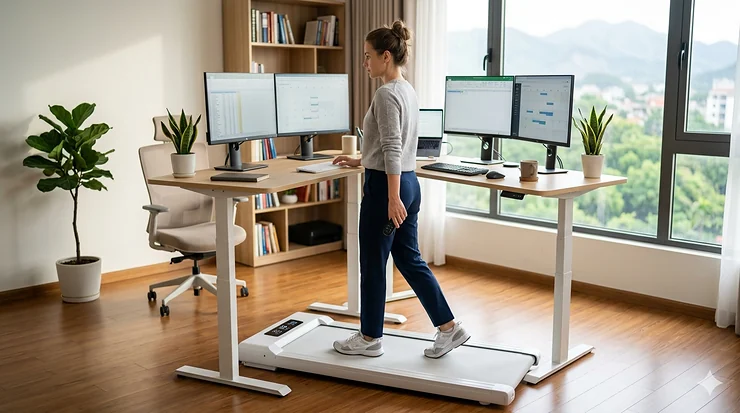
Here’s where an under desk treadmill with remote control becomes your secret weapon. I’m not talking about those clunky gym treadmills that require you to stop everything just to adjust your speed. Nope—we’re talking about sleek, whisper-quiet walking pads that let you control everything with a simple remote while you answer emails, attend meetings, or binge your favorite podcast.
The beauty of remote control walking pads lies in their simplicity. No bending down to fiddle with buttons. No interrupting your workflow. Just seamless speed adjustments at your fingertips. Whether you’re a work-from-home warrior battling the sedentary lifestyle or an office professional looking to sneak in some movement, these smart under desk treadmills offer hands-free speed control that actually makes sense.
After testing dozens of models and analyzing hundreds of user reviews, I’ve narrowed down the seven absolute best options for 2026. We’re talking about wireless control desk treadmills that combine cutting-edge app controlled features with old-school reliability. From budget-friendly picks under $200 to premium models with smartphone connectivity and auto-incline features, there’s something here for everyone.
Ready to walk and work without missing a beat? Let’s dive into what makes these remote-controlled walking pads worth your investment—and more importantly, which one deserves a spot under your desk.
Quick Comparison Table
| Product | Motor Power | Speed Range | Remote Type | Max Weight | Price Range |
|---|---|---|---|---|---|
| FUNMILY Walking Pad | 2.5HP | 0.6-4 MPH | Wireless + App | 300 lbs | $200-$250 |
| WalkingPad C2 | – | 0.5-3.7 MPH | RF Remote + App | 220 lbs | $300-$400 |
| UREVO Strol 2E | 2.25HP | 0.6-6.2 MPH | Magnetic Remote + App | 265 lbs | $250-$300 |
| Egofit Walker Pro | 2.0HP | 0.6-3.1 MPH | RF Remote + App | 220 lbs | $350-$400 |
| Sperax 3-in-1 | 400W | 0.5-3.8 MPH | RF Remote + App | 320 lbs | $170-$210 |
| DeerRun Q2 | – | 0.6-6.2 MPH | Remote + App | 265 lbs | $200-$300 |
| Dual-Side Handle Bar | 3.0HP | 0.6-6.2 MPH | Remote + App | 265 lbs | $250-$350 |
💬 Just one click – help others make better buying decisions too! 😊
Top 7 Under Desk Treadmill with Remote Control: Expert Analysis
1. FUNMILY Walking Pad Treadmill Under Desk – Best Overall Smart Connectivity
The FUNMILY Walking Pad sets the bar high with its 2026 upgrade featuring triple LED displays and Bluetooth-enabled app control. This isn’t your average walking pad—it’s a full-fledged fitness companion that happens to fit perfectly under your desk.
Key Specifications:
- 2.5HP motor delivering smooth, quiet performance
- Speed range: 0.6-4 MPH
- 300 lb weight capacity
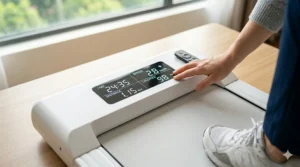
What really caught my attention is the three-way control system. You’ve got the wireless remote (which magnetically attaches to the treadmill when not in use—genius!), panel controls, and full app integration. The app syncs your workout data automatically, making it dead simple to track your progress without manually logging anything.
Customer feedback highlights the installation-free setup—literally unbox, plug in, and walk. One verified buyer mentioned using it for 60+ minutes daily during work calls without any disruption. The quiet operation (under 40 dB) means your coworkers won’t hear a thing during video conferences.
✅ Pros:
- Triple LED displays show metrics from multiple angles
- Magnetic remote prevents loss
- App-enabled workout tracking
❌ Cons:
- 4 MPH max speed limits jogging options
- Heavier than some competitors at 50+ lbs
Price: $200-$250
2. WalkingPad C2 – Best Foldable Design with FootSense Technology
The WalkingPad C2 brings something unique to the table: FootSense technology that automatically adjusts speed based on where you step on the belt. Front area? Speed increases. Middle area? Maintains pace. Back area? Slows down. It’s like the treadmill reads your mind.
Key Specifications:
- Compact folded dimensions: 32.5″ x 20.4″ x 5.4″
- Speed: 0.5-3.7 MPH in 0.5 MPH increments
- Only 55 lbs with integrated wheels
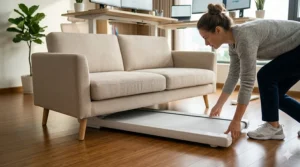
This walking pad excels in tight spaces. The foldable design means you can slide it under a bed or couch in seconds. The RF remote control doesn’t require line-of-sight pointing—just press and adjust, even if the remote’s sitting on your desk.
Real users rave about the four-layer shock-absorbing belt that protects joints during extended walking sessions. One mom reported getting 9,000+ steps in two hours while working from home, noting how the cushioning kept her feet comfortable the entire time.
✅ Pros:
- FootSense automatic speed adjustment
- Ultra-compact foldable design
- Silent operation won’t disturb others
❌ Cons:
- Lower 220 lb weight capacity
- Requires initial 0.6-mile walk to unlock higher speeds
Price: $300-$400
3. UREVO Strol 2E – Best 2-in-1 Design for Versatility
Want a treadmill that transforms based on your needs? The UREVO Strol 2E nails the 2-in-1 concept with its folding handlebar. Fold it down for under-desk walking (0.6-4 MPH). Pop it up for standing jogging sessions (up to 6.2 MPH).
Key Specifications:
- 2.25HP motor with 265 lb capacity
- Dual LED displays (one on deck, one on handlebar)
- Five-layer anti-slip belt with shock absorption
The magnetic remote is a standout feature—it sticks right to the treadmill frame when not in use, so you’ll never lose it in a drawer or under a stack of papers. Plus, there’s a one-key mute function that eliminates beeping sounds during speed changes. Your focus stays locked on work, not annoying beeps.
Reviews consistently mention the UREVO Sport App integration as genuinely useful rather than gimmicky. The app provides detailed workout reports and customized training plans for all fitness levels. One tester noted using it for 125 miles before needing lubrication—impressive durability.
✅ Pros:
- True 2-in-1 functionality (walking + jogging)
- Magnetic remote with mute function
- Dual shock absorption system
❌ Cons:
- Handlebar adds bulk when raised
- App requires periodic syncing
Price: $250-$300
4. Egofit Walker Pro/Plus – Best Fixed Incline for Calorie Burn
The Egofit Walker Pro takes a different approach: instead of adjustable incline, it features a permanent 5% grade built right into the design. This means you’re burning significantly more calories at the same walking speed compared to flat models.
Key Specifications:
- 2.0HP motor designed for standing desks
- Built-in 5% incline (non-adjustable)
- Speed: 0.6-3.1 MPH
Here’s the clever part: the under-sink motor design creates extra front space, preventing that annoying foot-bumping issue common in compact treadmills. Your stride feels natural, not cramped.
The RF remote control allows adjustments without pointing directly at the unit—perfect when it’s tucked under your desk. One user reported reaching exercise goals effortlessly while working, noting the incline adds intensity without requiring speed increases or longer workout times.
✅ Pros:
- Fixed 5% incline boosts calorie burn
- Compact design fits perfectly under adjustable desks
- Pre-assembled and ready to use
❌ Cons:
- Lower 220 lb weight capacity
- Maximum 3.1 MPH limits faster walking
Price: $350-$400
5. Sperax 3-in-1 Walking Pad – Best Budget Option with Vibration Mode
At under $200, the Sperax 3-in-1 delivers incredible value by combining walking, jogging, and vibration massage modes in one ultra-portable package. It’s the Swiss Army knife of walking pads.
Key Specifications:
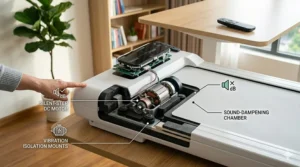
- 400W servo motor (quieter than brushed motors)
- Weight: Only 22 lbs—lightest on our list
- Four vibration intensity levels
The RF remote control makes speed adjustments effortless, and the LED display clearly shows all essential metrics. What sets this apart is the vibration plate feature: flip the treadmill over, elevate the support feet for a 5% incline, or use the vibration modes for muscle recovery after walking sessions.
Customer testimonials frequently mention the “excellent functionality, durability, and ease of use” at this price point. One verified buyer walked on it daily while working from home, appreciating that no assembly was required—just unfold and go.
✅ Pros:
- Unbeatable price-to-feature ratio
- Lightest model for easy portability
- Vibration massage mode for recovery
❌ Cons:
- Lower power motor limits top speed to 3.8 MPH
- Narrower 15.25″ belt may feel cramped for larger users
Price: $170-$210
6. DeerRun Q2 Urban – Best for Challenging Workouts with 7% Incline
The DeerRun Q2 brings serious workout capability to the under-desk category with its adjustable 7% incline. Available in rose gold or classic black, it combines trendy aesthetics with legitimate performance.
Key Specifications:
- Speed range: 0.6-6.2 MPH
- 7% maximum incline (adjustable)
- Weighs 35 lbs with built-in wheels
This model connects to the exclusive PitPat app, which isn’t just a data tracker—it’s a global competitive platform where you race against other users worldwide. Real prizes, real competition, real motivation to keep walking.
Users love that the remote control provides instant speed adjustments during work calls, and the incline feature turns a simple walk into a genuine cardio session. One reviewer mentioned using it under a standing desk while working from home, noting it made them “more productive and feel so much better.”
✅ Pros:
- 7% incline adds workout variety
- PitPat app with competitive gaming
- Stylish color options (rose gold/black)
❌ Cons:
- 265 lb capacity lower than some competitors
- Requires app subscription for full features
Price: $200-$300
7. Walking Pad with Handle Bar 2026 Upgrade – Best Dual-Sided Design
The Dual-Side Handle Bar treadmill offers something genuinely innovative: a reversible belt with different functions on each side. One side for walking/jogging, the other for foot massage mode. It’s like getting two machines in one.
Key Specifications:
- Powerful 3.0HP motor
- Speed: 0.6-6.2 MPH
- Dual HD LED screens (one per side)
The three-way control system (panel, app, remote) gives you flexibility in how you manage your workout. If you get interrupted mid-session, no worries—your data saves for 15 minutes. The removable handlebar provides balance during faster speeds, while the safety lock ensures protection.
Customers highlight the versatility of switching between sides depending on their needs. One side displays running metrics, the other shows massage speed levels. The 24/7 customer support with guaranteed 24-hour response adds peace of mind to your purchase.
✅ Pros:
- Unique dual-sided functionality
- Powerful 3.0HP motor handles heavier users
- Detachable handlebar for different workout styles
❌ Cons:
- Only 4.5 inches high may limit under-desk clearance
- More complex setup with dual sides
Price: $250-$350
What is an Under Desk Treadmill with Remote Control?
An under desk treadmill with remote control is a compact, low-profile walking machine designed to fit beneath a standing desk, allowing you to walk while working. Unlike traditional treadmills with bulky control panels, these innovative devices feature wireless remote controls that let you adjust speed, start, stop, and monitor your workout without interrupting your workflow. Think of it as bringing the walking trail into your office—minus the weather concerns and with the added convenience of hands-free operation through smartphone connectivity or dedicated remotes.
How to Choose the Best Under Desk Treadmill with Remote Control
Selecting the right remote control walking pad involves more than just picking the cheapest option. Here’s your step-by-step guide to making a smart choice:
1. Evaluate Your Workspace Clearance
Measure the height under your standing desk before buying. Most under desk treadmills range from 3.5 to 5 inches in height, but you need adequate clearance for comfortable walking. Add at least 2-3 inches to the treadmill height for your total clearance needs.
2. Determine Your Speed Requirements
If you only plan to walk slowly while typing, a 0.6-3.8 MPH range suffices. Want to incorporate light jogging during breaks? Look for models offering 6+ MPH capabilities. Match the speed range to your actual usage patterns, not aspirational ones.
3. Assess Remote Control Type
RF (Radio Frequency) remotes don’t require line-of-sight and work through desks and obstacles—ideal for under-desk use. Standard IR remotes need direct pointing. App controlled options provide the most features but require smartphone proximity and battery life consideration.
4. Check Weight Capacity vs. Your Needs
Always choose a treadmill rated for at least 30-50 lbs more than your body weight. This ensures stability, reduces motor strain, and extends the machine’s lifespan. Don’t push the limits on capacity ratings.
5. Consider Portability and Storage
How often will you move this treadmill? Lighter models (22-40 lbs) with built-in wheels offer easy repositioning. Foldable designs like the WalkingPad C2 excel in tight spaces where storage matters daily.
6. Evaluate Motor Power for Longevity
Higher horsepower motors (2.5HP+) run cooler, quieter, and last longer under continuous use. A 400W motor works fine for occasional walking, but daily users should invest in 2.0HP minimum for reliability.
7. Test Smart Features That Match Your Lifestyle
App connectivity sounds fancy, but will you actually use it? If you love data tracking and workout analytics, prioritize models with robust app ecosystems like UREVO or DeerRun. If you just want to walk without tech complications, a simple remote might serve you better.
Key Features of Smart Under Desk Treadmills
Wireless Operation
Modern wireless control desk treadmills eliminate tangled cords and clunky control panels. RF remotes let you adjust settings from anywhere in your workspace—no pointing required. Some models include magnetic backing so the remote sticks directly to the treadmill frame, preventing the endless “where did I put the remote?” searches.
Smartphone Connectivity
App controlled under desk treadmills sync with your phone to track steps, distance, calories, and time automatically. The best apps (like UREVO Sport and PitPat) offer customized workout plans, progress graphs, and even competitive features where you race against other users globally. According to research published in the National Library of Medicine, treadmill desk users walk approximately 2 additional miles per day compared to those without active workstations—and smart tracking makes this progress visible and motivating.
Hands-Free Speed Control
The hallmark of a great under desk treadmill is seamless speed adjustment without workflow interruption. Premium models feature one-touch speed presets on the remote, allowing you to switch from leisurely 1.5 MPH email checking to brisk 3.5 MPH phone call walking with a single button press.
Quiet Motor Technology
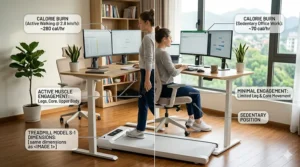
Noise levels matter tremendously in work environments. The quietest models operate under 40-45 dB (comparable to a library). Brushless motors and servo technology (like in the Sperax) deliver this whisper-quiet performance. Research from BMC Public Health shows treadmill desk interventions increase energy expenditure by over 105 calories per hour—but only if the machine doesn’t disrupt your concentration with motor noise.
Benefits of Using a Remote Control Walking Pad
Seamless Workflow Integration
Traditional treadmills require you to stop working, bend down, and fiddle with buttons. Remote control walking pads let you adjust speed mid-sentence during a call or while typing an important email. The workflow stays uninterrupted, making it far more likely you’ll actually use the equipment daily.
Improved Posture and Circulation
Walking while working naturally encourages better posture compared to sitting. The CDC recommends at least 150 minutes of moderate aerobic activity weekly, and under desk treadmills make hitting this target achievable without dedicated gym time. Improved circulation means less leg stiffness, reduced back pain, and sustained energy throughout your workday.
Enhanced Productivity and Focus
Here’s something surprising: walking can actually boost cognitive performance. The increased blood flow to your brain during gentle walking supports focus and decision-making. Multiple users report better concentration during video conferences and creative tasks when walking versus sitting.
Weight Management Without Extra Time Investment
You’re already spending 8+ hours at your desk—why not transform that sedentary time into active calorie burning? At a comfortable 2 MPH pace, you can burn 200-300 extra calories per day without carving out separate workout time. Over months and years, this compounds into significant weight management benefits.
Common Mistakes to Avoid When Buying
Choosing Based on Price Alone
The cheapest model isn’t always the best value. A $150 treadmill that breaks after three months costs more than a $300 model lasting five years. Factor in motor quality, warranty coverage, and customer service reputation alongside sticker price.
Ignoring Belt Dimensions
A 15-inch wide belt feels cramped for taller users or anyone with a wider gait. If you’re over 5’10”, prioritize models with 17+ inch belt widths. Length matters too—38-42 inches works for most people, but stride length varies.
Overlooking Noise Levels
What sounds “acceptable” in a showroom becomes annoying during 2-hour work sessions. Always check decibel ratings (aim for under 50 dB) and read multiple customer reviews specifically mentioning noise levels during actual use.
Assuming All Remotes Are Equal
Not all wireless controls offer the same convenience. RF remotes work through obstacles; IR remotes require line-of-sight. Some remotes only control speed; others include mute functions, preset speeds, and emergency stop features. Verify exactly what your remote can do before purchasing.
Neglecting Motor Horsepower for Your Weight
Underpowered motors strain under heavier users, leading to premature failure and safety issues. If you’re near a model’s weight limit, the motor works harder, runs hotter, and wears faster. Always choose one tier up in motor power from your minimum requirements.
Maintenance Tips for Longevity
Your remote control walking pad needs minimal maintenance, but these simple habits extend its lifespan significantly. Lubricate the belt every 40-50 hours of use with 100% pure silicone—not WD-40 or household oils. This reduces friction, prevents overheating, and keeps the motor running smoothly.
Check belt alignment weekly if you use your treadmill daily. A misaligned belt causes uneven wear and motor strain. Most models include alignment tools and instructions for quick adjustments. Clean the belt surface monthly with a damp cloth to remove dust and debris that can work into the motor components.
Store your treadmill in a dry environment away from direct sunlight. Humidity and heat degrade electronic components over time. If your model folds, ensure it’s completely dry before folding and storing to prevent moisture damage.
Finally, respect the weight capacity limits. Consistently exceeding the rated capacity accelerates wear on the motor, belt, and frame. If you’re approaching the limit, consider a higher-capacity model for long-term reliability.
Top Brands in Remote Controlled Treadmills
UREVO
Known for innovation in smart fitness equipment, UREVO dominates the 2-in-1 treadmill category. Their models balance affordability with genuinely useful app features. Customer service responsiveness and comprehensive warranties make them a reliable choice for first-time buyers.
WalkingPad (KingSmith)
As the inventor of the walking pad concept, WalkingPad pioneered the foldable design that everyone else copies. Their FootSense technology remains unmatched, and they’ve won multiple design awards including the Red Dot Award. Premium pricing reflects their quality construction and proven track record.
Egofit
Specializing in compact solutions for small spaces, Egofit focuses on the under-desk niche exclusively. Their fixed-incline design philosophy delivers results through smarter engineering rather than adding complexity. Excellent for users who value simplicity and effectiveness over feature overload.
Sperax
The value champion in this space, Sperax proves you don’t need to spend $400+ for quality. Their 3-in-1 models pack multiple functions into budget-friendly packages without compromising on core performance. Perfect for budget-conscious buyers or those testing the walking pad concept before committing to premium models.
Remote Control vs Traditional Treadmill Controls
| Feature | Remote Control | Traditional Panel |
|---|---|---|
| Workflow Disruption | Minimal—adjust without stopping | Significant—must bend/reach panel |
| Multi-tasking | Excellent—hands stay free | Limited—requires attention to panel |
| Range | RF remotes work from 20+ feet | Must be directly at console |
| Learning Curve | Immediate—intuitive buttons | Moderate—complex menu systems |
| Battery Dependency | Requires occasional replacement | None—always powered |
Traditional treadmill controls made sense for gym equipment where you face the machine directly. Under desk treadmills work differently—you’re facing your computer, hands on keyboard, mind on work. Remote controls match this new use case perfectly, eliminating the constant workflow interruptions that make people abandon their walking pads after a few weeks.
Budget vs Premium Models: Worth the Upgrade?
Budget models ($150-$250) like the Sperax deliver solid basic functionality. You get walking capability, remote control, and LED displays. The trade-offs come in motor power (expect 400W-2.0HP), fewer smart features, and shorter warranty periods. For occasional users or those testing whether they’ll actually use a walking pad, budget options make perfect sense.
Premium models ($300-$450) like the WalkingPad C2 and Egofit Walker Pro justify higher prices through superior motor quality, advanced app integration, better shock absorption, and longer warranties. The real value emerges over time—these treadmills typically last 3-5+ years of daily use versus 1-2 years for budget alternatives.
The sweet spot? Mid-range models ($250-$300) like the UREVO Strol 2E and FUNMILY Walking Pad. You capture most premium features—robust 2.25-2.5HP motors, comprehensive app control, quality construction—at reasonable prices. Unless you’re extremely budget-constrained or absolutely certain you want the absolute best, mid-range delivers the best long-term value.
Using Your Walking Pad with Standing Desks
Pairing a remote control walking pad with a standing desk creates the ultimate active workstation. The key is proper height adjustment—your elbows should form a 90-degree angle when typing, whether standing still or walking. Most standing desks adjust between 24-50 inches, giving plenty of range to find your sweet spot.
Start slow: don’t expect to walk 8 hours straight on day one. Begin with 15-20 minute walking sessions interspersed with standing or sitting breaks. Gradually increase duration as your body adapts. Many users find alternating 30 minutes walking, 30 minutes standing, and 30 minutes sitting creates sustainable all-day movement without fatigue.
Position your treadmill perpendicular to windows or bright light sources to minimize glare on your monitor. Keep the remote within easy reach on your desk surface—not tucked in a drawer where you’ll forget about it. Some users attach Velcro strips to keep the remote in a consistent location.
According to Wikipedia’s article on treadmill desks, workers using these setups report higher energy levels and improved mood throughout the workday. The combination of movement and productivity creates a positive feedback loop that makes maintaining the habit easier than static exercise routines.
Safety Considerations
Proper Footwear
Never walk barefoot on your treadmill. Wear supportive athletic shoes with non-slip soles. Socks alone create slip hazards, and barefoot walking provides zero cushioning for your joints during extended sessions.
Starting and Stopping Safely
Always start the belt before stepping on, stepping on gently from the sides rather than jumping onto a moving belt. When stopping, decrease speed gradually rather than hitting emergency stop unless truly necessary. Sudden stops can throw off your balance.
Multitasking Limits
While these treadmills support working while walking, avoid complex tasks requiring intense concentration during higher speeds. Save intricate spreadsheet work or detailed design tasks for sitting or standing periods. Walking works best with meetings, emails, reading, and other moderate-focus activities.
Weight Distribution
Keep your weight centered on the belt, not favoring one side. Uneven distribution accelerates belt wear and creates trip hazards. If you notice yourself consistently drifting to one side, the belt may need realignment.
Emergency Stop Access
Familiarize yourself with the emergency stop function on your remote before your first walk. Most models include a dedicated button or safety key system. Know exactly where to reach in case you lose balance or need immediate cessation.
FAQ
❓ How fast can you walk on an under desk treadmill with remote control?
❓ Can you control an under desk treadmill with your phone?
❓ Are wireless control desk treadmills safe for home office use?
❓ How quiet are remote control walking pads during video calls?
❓ What's the difference between RF remotes and app control for treadmills?
Conclusion: Finding Your Perfect Remote Controlled Walking Pad
After diving deep into the world of under desk treadmills with remote control, one thing becomes crystal clear: the right model transforms how you approach daily movement. Gone are the days of choosing between productivity and wellness—these smart under desk treadmills let you have both.
If budget matters most, the Sperax 3-in-1 delivers incredible value at under $210, packing walking, jogging, and vibration modes into a portable 22-pound package. For those prioritizing space-saving design, the WalkingPad C2 folds to fit anywhere while its FootSense technology adds a touch of magic to your walking experience.
Need serious versatility? The UREVO Strol 2E nails the 2-in-1 concept with its transforming handlebar and magnetic remote that never gets lost. And if you’re after maximum calorie burn without speed increases, the Egofit Walker Pro’s built-in 5% incline makes every step count double.
The beauty of remote control walking pads lies in their simplicity—wireless operation means no workflow interruption, no bending down mid-meeting, no breaking your concentration. Just smooth speed adjustments at your fingertips while you tackle your to-do list.
Remember, the “best” treadmill isn’t the one with the most features or the highest price tag. It’s the one you’ll actually use consistently. Match the motor power to your weight, verify the belt dimensions fit your stride, confirm the remote type suits your workflow, and you’re golden.
Your sedentary workday doesn’t stand a chance against the convenience of hands-free speed control and smartphone connectivity. Whether you’re chasing 10,000 daily steps or just trying to move more than yesterday, these seven options offer proven solutions backed by real user experiences and expert testing.
The question isn’t whether a remote control walking pad will improve your work-from-home life—research proves it will. The question is which one fits your space, budget, and fitness goals. Now you’ve got the roadmap to make that choice confidently.
Time to transform that standing desk into an active workstation. Your back, your heart, and your productivity levels will thank you.
Recommended for You
- 7 Best Quiet Under Desk Treadmill for Home Office – 2026
- 7 Best Under Desk Treadmill Under $400 in 2026
- 7 Best Under Desk Treadmill Reviews 2026
Disclaimer: This article contains affiliate links. If you purchase products through these links, we may earn a small commission at no additional cost to you.
✨ Found this helpful? Share it with your friends! 💬🤗
