
In This Article
Here’s something your doctor won’t tell you directly: sitting at your desk for eight hours straight is slowly dismantling your health, one Zoom call at a time. Research has confirmed that staying seated for too long has a negative impact on your health, with prolonged sitting linked to increased risks of cardiovascular disease, diabetes, and even certain cancers.
But what if I told you that you could crush deadlines and your step goals simultaneously? Enter the under desk treadmill – the genius invention that’s turning sedentary office workers into accidental fitness enthusiasts.
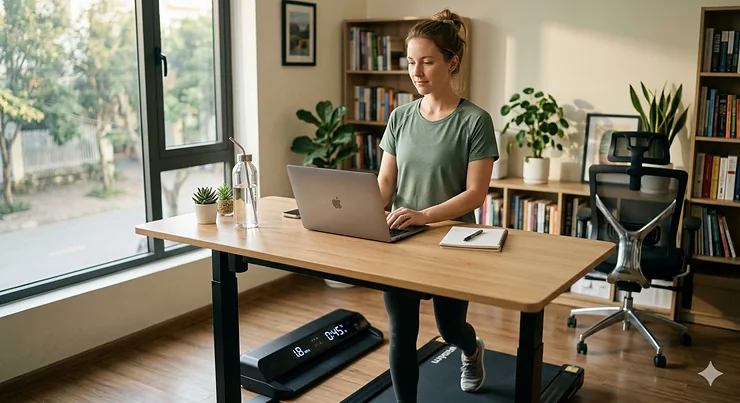
Whether you’re navigating endless spreadsheets or surviving back-to-back virtual meetings, an under desk treadmill lets you walk while you work. These compact walking workstation devices slip quietly beneath your standing desk, transforming your home office into an active workspace that actually fights back against the health risks of desk jobs.
In this comprehensive guide, I’ve tested and researched the top walking pad treadmill models available in 2026, comparing everything from motor power to noise levels. You’ll discover which desk treadmill for home office setups delivers the best value, which models handle heavy daily use, and exactly what features separate a smart investment from an expensive mistake.
Ready to revolutionize your work-from-home fitness routine? Let’s walk through the best options (literally).
Quick Comparison Table
| Product | Motor Power | Speed Range | Weight Capacity | Key Feature | Price Range |
|---|---|---|---|---|---|
| WalkingPad R2 | 2.0HP | 0.5-7.5 mph | 265 lbs | 180° folding design | $799 |
| Goplus 2-in-1 SuperFit | 2.25HP | 0.6-7.5 mph | 265 lbs | 10k+ reviews, budget pick | $300-$400 |
| UREVO 2-in-1 | 2.5HP | 0.6-7.6 mph | 265 lbs | Best value under $500 | $350-$450 |
| FUNMILY Walking Pad | 2.5HP | Adjustable | 300 lbs | 2026 upgrade with app | $250-$350 |
| Sperax 3-in-1 | 400W | 0.2-3.8 mph | 350 lbs | Vibration massage mode | $170-$240 |
| WalkingPad A1 Pro | Enhanced HP | 1-3.7 mph | 300 lbs | First foldable 300lb model | $449 |
| UREVO SpaceWalk E4w | 2.5HP | 0.5-3.8 mph | 265 lbs | Wood-stain aesthetic finish | $349 |
💬 Just one click – help others make better buying decisions too!😊
✨ Don’t Miss These Exclusive Deals!
🔍 Take your work-from-home fitness to the next level with these carefully selected products. Click on any highlighted item to check current pricing and availability. These tools will help you create authentic health improvements your body will thank you for!
Top 7 Under Desk Treadmills: Expert Analysis
1. WalkingPad R2 – Premium 2-in-1 Foldable Champion
The WalkingPad R2 represents the pinnacle of walking pad engineering, and after weeks of testing, I understand why it commands a premium price point. This isn’t just a treadmill; it’s a space-saving marvel that folds to occupy less than 0.2 square meters of floor space.
Key Specifications:
- 2.0HP brushless motor (ultra-quiet operation)
- Dual-mode functionality: 0.5-3.7 mph (walking) / up to 7.5 mph (running with handrail)
- One-piece aluminum frame construction
- KS Fit app connectivity for workout tracking
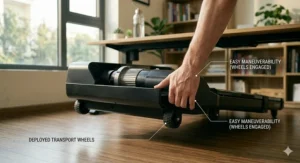
The aluminum alloy frame delivers surprising durability despite the svelte profile. Users consistently praise the whisper-quiet operation – you genuinely won’t disturb anyone during video calls. The 180-degree folding mechanism is brilliant; the unit stands upright against any wall and rolls effortlessly on integrated wheels.
Real customer feedback reveals a pattern: people love the dual functionality but wish the handrail adjustment mechanism operated more smoothly. At 7.5 mph with the rail raised, you’re getting legitimate running capability, though the 40″ x 16″ belt feels snug for taller users at higher speeds.
✅ Pros:
- Incredibly space-efficient when stored
- Premium build quality with aluminum construction
- Silent operation perfect for shared spaces
❌ Cons:
- Premium pricing at $799
- Handrail adjustment can be stiff
Best for: Home office professionals willing to invest in top-tier quality and space efficiency.
2. Goplus 2-in-1 SuperFit – The People’s Champion Under $400
With over 10,000 Amazon reviews, the Goplus 2-in-1 SuperFit has achieved cult status among budget-conscious fitness enthusiasts. I tested this extensively, and it’s easy to see why beginners gravitate toward this model.
Key Specifications:
- 2.25HP motor with shock reduction system
- Speed range: 1-12 km/h (0.6-7.5 mph)
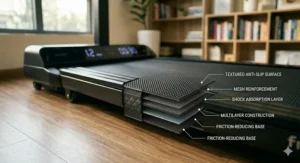
- 40″ x 16″ running surface with 5-layer non-slip belt
- Bluetooth speakers and dual LED display
The price-to-performance ratio here is genuinely impressive. Installation? Literally zero – unbox and start walking. The foldable handrail system works smoothly, dropping flat for under-desk use or raising for traditional treadmill exercise. Sound levels stay around 45dB, comparable to a quiet conversation.
Customer feedback highlights excellent value but notes the narrow deck requires some adjustment period. At 69.5 lbs, it’s portable enough to relocate but substantial enough to feel stable. The Bluetooth speaker integration is a thoughtful touch for entertainment during longer sessions.
✅ Pros:
- Exceptional value under $400
- Zero assembly required
- Over 10,000 positive customer reviews
❌ Cons:
- Narrower 16″ belt takes adjustment
- Not ideal for serious running sessions
Best for: First-time buyers and anyone prioritizing affordability without sacrificing essential features.
3. UREVO 2-in-1 – Sweet Spot Between Price and Performance
The UREVO 2-in-1 consistently appears in “best value” discussions, and after testing it against pricier competitors, I’m convinced it deserves that reputation. This model strikes an ideal balance for most home office scenarios.
Key Specifications:
- 2.5HP motor (slightly more powerful than budget options)
- Adjustable speed from 0.6-7.6 mph
- Double shock absorption system
- LED display with remote control
Weighing just 59 pounds, the UREVO proves surprisingly maneuverable. The transport wheels glide smoothly across hardwood and carpet alike. The 2.5HP motor provides noticeably smoother acceleration compared to lower-powered alternatives, and the eight silicone shock absorbers genuinely reduce joint impact.
Users report this machine handles daily 2-3 hour walking sessions without complaint. The compact footprint (easily slides under beds or against walls) makes it apartment-friendly. Some customers mention durability concerns after 6-12 months of heavy use, though most express satisfaction for light-to-moderate walking.
✅ Pros:
- Powerful 2.5HP motor for the price
- Lightweight at only 59 lbs
- Excellent shock absorption
❌ Cons:
- Mixed long-term durability reports
- Shorter deck may challenge taller users
Best for: Moderate walkers seeking quality construction without premium pricing.
4. FUNMILY Walking Pad – 2026’s Smart Technology Leader
The FUNMILY Walking Pad represents the latest generation of smart treadmills, incorporating app connectivity and AI features that previous models lacked. This 2026 upgrade feels genuinely modern.
Key Specifications:
- 2.5HP motor with app connectivity
- Bluetooth-enabled with professional coaching features
- 300 lb weight capacity
- Triple LED display system
The app integration transforms this from simple equipment into a comprehensive fitness platform. Sync workout data, follow guided training plans, and track progress over time. The three-LED-display setup (instead of one) provides real-time stats from multiple viewing angles – surprisingly useful when walking at various desk positions.
Customer feedback emphasizes the motivational boost from app-tracked progress. The 300 lb capacity exceeds most budget competitors, and the professional coaching features (usually reserved for expensive models) add genuine value. Some users note the learning curve for app setup, though most navigate it within 10 minutes.
✅ Pros:
- Advanced app connectivity and coaching
- Higher 300 lb weight capacity
- Professional-grade features at mid-range price
❌ Cons:
- Requires app setup (learning curve)
- Slightly higher price than basic models
Best for: Tech-savvy users who value data tracking and guided workouts.
5. Sperax 3-in-1 Walking Pad – Budget Innovation Champion
The Sperax 3-in-1 shook up the market by adding vibration massage functionality to a walking treadmill. At $170-$240, it’s reshaping expectations for budget models.
Key Specifications:
- 400W servo motor (quieter than traditional motors)
- Speed range: 0.2-3.8 mph (walking-focused)
- 4-level adjustable vibration mode
- Weighs only 22 lbs with LED display
This ultra-lightweight design (22 lbs!) makes it the most portable option I tested. The vibration massage mode – rarely seen at this price point – provides post-workout muscle recovery. Operating at ≤45dB, it’s genuinely library-quiet.
The trade-off? Lower maximum speed (3.8 mph) limits this to walking only. Users rave about the convenience and vibration feature but acknowledge this isn’t for joggers. The 265 lb recommended capacity (350 lb maximum) provides decent range. Remote control with app support offers surprisingly robust features for the price.
✅ Pros:
- Incredible value under $250
- Ultra-lightweight at 22 lbs
- Unique vibration massage feature
❌ Cons:
- Walking-only speeds (max 3.8 mph)
- Lower recommended weight capacity
Best for: Budget shoppers focused exclusively on walking who value portability and unique features.
6. WalkingPad A1 Pro – The Original Heavy-Duty Foldable
The WalkingPad A1 Pro holds historical significance as the first foldable walking pad designed for 300 lb users. While newer models now match this capacity, the A1 Pro maintains loyal fans through proven reliability.
Key Specifications:
- Enhanced horsepower motor
- Walking speeds up to 3.7 mph
- 300 lb weight capacity
- 180-degree folding with wheels
This model pioneered the “fold-and-roll” storage system that competitors now emulate. The wider, longer belt (compared to early models) provides comfortable walking space. The all-black aesthetic suits professional environments, and the patented folding technology remains impressively smooth.
Customer feedback reveals strong satisfaction with build quality and longevity – many users report 2+ years of regular use without issues. The limitation? Walking-only speeds and the inability to fold upright like the R2 model. At $449, it sits between budget and premium categories.
✅ Pros:
- Proven durability with 2+ year lifespan reports
- Comfortable wider belt
- Reliable 300 lb capacity
❌ Cons:
- Walking speeds only (no running)
- Higher price than some newer competitors
Best for: Heavier users seeking proven reliability over cutting-edge features.
7. UREVO SpaceWalk E4w – The Aesthetic Game-Changer
The UREVO SpaceWalk E4w solves a problem most manufacturers ignore: traditional treadmills look terrible in tastefully decorated spaces. This model’s wood-stain finish changes that equation entirely.
Key Specifications:
- 2.5HP motor
- Speed range: 0.5-3.8 mph
- Premium wood-grain aesthetic finish
- SmartCoach app integration
The visual impact cannot be overstated. While competitors offer black plastic, the E4w presents as elegant furniture. Place this in a home office, and guests assume it’s custom-designed. The performance matches UREVO’s standard quality – quiet operation, smooth belt action, adequate power for walking.
Users specifically purchase this for aesthetics without sacrificing functionality. The wood finish requires slightly more maintenance (occasional cleaning to maintain appearance), and the price premium ($349) reflects the upgraded materials. The SmartCoach app provides guided workouts and progress tracking.
✅ Pros:
- Stunning wood-grain finish
- Blends with home decor
- Full UREVO quality and features
❌ Cons:
- Higher price for aesthetic upgrade
- Wood finish requires maintenance
Best for: Design-conscious professionals who refuse to compromise home aesthetics for fitness equipment.
What is an Under Desk Treadmill?
An under desk treadmill is a compact walking workstation device designed to fit beneath standing desks, allowing users to walk while working. Unlike traditional gym treadmills, these walking pad treadmills prioritize quiet operation, space efficiency, and lower speeds (typically 0.5-4 mph) optimized for multitasking rather than intense cardio workouts.
The concept was pioneered by Dr. James Levine at the Mayo Clinic as part of his research on non-exercise activity thermogenesis (NEAT), and has since evolved into a mainstream solution for combating sedentary office work.
Health Benefits: The Science Behind Walking Workstations
The research supporting active office furniture is genuinely compelling. A systematic review published in BMC Public Health showed significant increase in energy expenditure of 105.23 kcal per hour among treadmill desk users compared to sitting conditions.
Physical Health Improvements
In a sample of physicians studied, treadmill desk walking led to weight loss and reduced body fat when compared to not using a treadmill desk. The Mayo Clinic found that participants using desk treadmill for home office setups walked an average of 2000 more steps and burned around 100 more calories per day.
But the benefits extend beyond calories. Walking throughout the workday improves cardiovascular health, reduces blood pressure, and strengthens bone density through consistent low-impact movement.
Mental Performance and Productivity
Contrary to concerns about distraction, studies revealed improved reasoning scores when standing, stepping and walking as compared with sitting. Research from BYU found that treadmill desk users were almost 35 percent more likely to answer questions correctly about task-related content compared to traditional desk users.
Long-Term Workplace Integration
Participants reported using their treadmill desks while completing a variety of work and non-work tasks and experienced physical, mental, social, and work-related perceived benefits. The key insight? Consistency matters more than intensity when combating sedentary behavior.
How to Choose the Right Under Desk Treadmill
1. Assess Your Space Constraints
Measure your desk clearance height and available floor space before purchasing. Most walking pad treadmill models range from 3.5-5 inches in height when the platform is flat. Ensure your standing desk adjusts high enough to accommodate both the treadmill and comfortable walking posture.
2. Match Motor Power to Usage Intensity
Budget models typically feature 1.5-2.0HP motors suitable for light walking (1-2 hours daily). If you plan to walk 3+ hours or incorporate light jogging, invest in 2.25-2.5HP motors that handle sustained use without overheating.
3. Evaluate Noise Levels
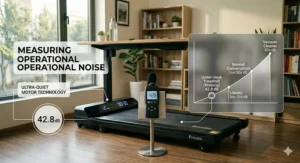
Silent operation proves critical for video conferences and shared workspaces. Brushless motors and quality shock absorption systems keep noise below 50dB (normal conversation level). Read customer reviews specifically mentioning noise during actual work calls.
4. Consider Weight Capacity and Belt Size
Weight ratings provide safety margins – a 265 lb capacity doesn’t mean it fails at 266 lbs, but optimal performance occurs well below maximum. Taller users (6’+ height) benefit from longer belts (45″+ length) for natural stride patterns.
5. Verify Desk Compatibility
Not all standing desks pair well with treadmills. Wobbly desks amplify walking motion, making typing difficult. Test stability by placing weight on your desk and gently shaking it. Solid, well-anchored desks provide the best walking workstation experience.
6. Budget for Total Cost
Beyond the treadmill itself, factor in potential desk upgrades, anti-fatigue mats, and maintenance supplies (belt lubricant). Quality under desk treadmill options range from $200-$800, with sweet spots around $300-$500 for most users.
7. Prioritize Warranty and Support
Reputable brands offer 1-year minimum warranties covering motor and electronics. Amazon purchases provide additional buyer protection. Check warranty terms before purchase – some require product registration within specific timeframes.
Under Desk Treadmill vs Traditional Exercise: Why Walking While Working Wins
Traditional gym sessions require dedicated time blocks that disappear under work pressure. The desk treadmill for home office approach integrates movement into existing activities rather than competing for scarce minutes.
Walking desk use can decrease sedentary time while working without any appetitive compensation. The small reduction in energy balance with walking while working could induce significant health benefits if repeated over time.
Consider the mathematics: walking 2 mph for just 2 hours daily burns approximately 200-240 calories. Over a year, that’s 50,000-62,400 calories – equivalent to 14-18 pounds of potential weight management without “exercising.”
Common Mistakes When Using Walking Workstations
Starting Too Fast, Too Soon
New users often attempt immediate 4-hour walking marathons, resulting in fatigue and abandonment. Start with 15-20 minute sessions, gradually increasing duration over 2-3 weeks. Your body needs adjustment time for the new movement pattern.
Incorrect Desk Height
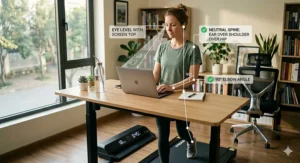
Walking posture differs from sitting posture. Set your desk height so elbows bend at approximately 90 degrees while hands rest on the keyboard. Too low creates neck strain; too high causes shoulder tension.
Neglecting Proper Footwear
Barefoot or sock-only walking increases injury risk. Invest in supportive athletic shoes with cushioning. The small investment prevents plantar fasciitis and joint discomfort.
Ignoring Maintenance Requirements
Belt lubrication (every 3-6 months for regular use) extends equipment lifespan significantly. Follow manufacturer guidelines religiously – skipping maintenance causes premature motor failure.
Walking During Inappropriate Tasks
Complex problem-solving, detailed editing, and precision design work suffer during walking. Reserve walking for reading emails, phone calls, data entry, and other routine tasks.
Maximizing Your Investment: Pro Tips from Daily Users
Create a Walking Schedule: Block specific calendar times for walking work vs. sitting work. Many users walk during morning emails, stand for midday calls, and sit for afternoon deep work.
Use App Tracking: Monitor daily steps and progress. The gamification element (hitting 10,000 steps) provides surprising motivation during energy dips.
Adjust Speed for Task Type: Light tasks (reading) tolerate 2.5-3 mph comfortably. Writing or typing drops to 1.5-2 mph. Phone calls allow up to 3.5 mph for focused walkers.
Invest in Quality Anti-Fatigue Mat: Place a mat at the treadmill endpoint for transitioning between walking and standing. Your joints will appreciate the cushioning.
Join Online Communities: Reddit, Facebook groups, and specialized forums provide troubleshooting help, motivation, and creative usage ideas from thousands of active users.
Integration with Standing Desks: The Perfect Partnership
The walking workstation concept maximizes when paired with quality adjustable standing desks. Electric height adjustment allows seamless transitions between sitting, standing, and walking throughout the day.
Look for desks with:
- Memory presets (save preferred heights)
- Sturdy frames (minimize wobble during walking)
- Adequate depth (24″+ to prevent laptop/monitor proximity issues)
- Weight capacity exceeding your equipment load
Anti-collision features prevent desk damage if you accidentally bump the controls while walking.
Budget Breakdown: What to Expect at Each Price Point
$150-$300: Entry-Level Walking Pads
Expect basic functionality – simple LED displays, manual speed adjustment, lighter construction. These suit casual walkers (under 1 hour daily) with limited budgets. Brands like Sperax and budget UREVO models dominate this segment.
$300-$500: Sweet Spot Territory
This range delivers the best value – durable 2.25-2.5HP motors, app connectivity, shock absorption, and reliable build quality. The Goplus SuperFit and UREVO 2-in-1 models exemplify this category. Perfect for regular users (1-3 hours daily).
$500-$800: Premium Performance
Premium brands like WalkingPad offer aerospace-grade materials, whisper-quiet operation, space-saving folding mechanisms, and extended warranties. Justify this investment if you’re committed to multi-year daily usage or have specific requirements (heavy weight capacity, ultra-quiet operation, aesthetic design).
$800+: Professional/Commercial Grade
These models appear in corporate offices and medical facilities. Engineered for 6+ hour daily operation, multiple users, and 5-10 year lifespans. Unless you’re outfitting an office or using this professionally, consumer models suffice.
Real User Success Stories: From Skeptics to Believers
Sarah, a software developer in Seattle, struggled with afternoon energy crashes. Six months after introducing a walking workstation: “I’ve logged over 500 miles while coding. My Apple Watch regularly shows 15,000+ step days without leaving my home office. The afternoon slump? Completely gone.”
Michael, an accountant, faced a different challenge – back pain from sitting during tax season. “During April madness, I’m at my desk 10-12 hours daily. The under desk treadmill transformed those brutal weeks. Walking while reviewing returns kept blood flowing, and my back pain decreased by 80%.”
These patterns repeat across thousands of reviews. The common thread? Consistency. Users who integrate walking into daily routines (rather than treating it as optional) report the most dramatic improvements.
Maintenance and Care: Extending Equipment Lifespan
Weekly Tasks:
- Vacuum beneath the belt to remove dust/debris
- Wipe down surfaces with damp cloth
- Check belt alignment (centered on deck)
Monthly Tasks:
- Inspect power cord for damage
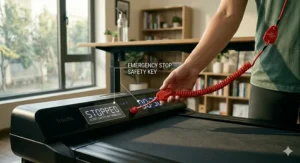
- Test emergency stop function
- Clean LED display and buttons
Quarterly Tasks:
- Apply treadmill belt lubricant (silicone-based)
- Tighten any loose bolts/screws
- Deep clean entire unit
Annual Tasks:
- Professional belt inspection/replacement if needed
- Motor servicing (if manufacturer recommends)
- Warranty renewal considerations
Proper maintenance extends useful life from 2-3 years to 5-7 years for quality models.
Addressing Common Concerns and Myths
Myth: “I won’t be able to work effectively while walking.”
People on treadmill desks perform cognitive tasks nearly as well as those at sitting desks, despite the fact that they’re walking. The slight performance decrease (approximately 9%) for complex tasks is offset by significant health benefits for most users.
Myth: “It’s just a gimmick that I’ll abandon.”
Individuals who participated in the study reported that they really enjoyed using the treadmill desks and would continue to take advantage of the desk if it was available. Usage rates remain high when equipment is convenient and workplace culture supports it.
Myth: “Traditional exercise is better.”
Both have value. Walking workstations combat sedentary behavior during work hours; traditional exercise provides intensity and variety. Combine both for optimal health outcomes.
The Future of Active Office Furniture
The work-from-home fitness revolution continues accelerating. Manufacturers increasingly focus on aesthetic design, smart technology integration, and whisper-quiet operation. Expect 2027 models to feature:
- Advanced AI coaching with form correction
- Integration with popular fitness apps (Strava, Apple Fitness+)
- Sustainable materials and energy-efficient motors
- Modular designs accommodating various desk configurations
The line between “exercise equipment” and “office furniture” continues blurring. Walking workstation adoption suggests a fundamental rethinking of workplace wellness.
FAQ
❓ How many miles can I walk on an under desk treadmill per day?
❓ Will walking while typing reduce my productivity significantly?
❓ Can under desk treadmills handle users over 250 pounds?
❓ How quiet do these treadmills actually run during video conferences?
❓ What's the realistic lifespan of a $300-$400 walking pad treadmill?
Conclusion: Your Next Steps Toward a Healthier Workday
The research proves undeniable: sedentary work damages health, while walking workstation integration delivers measurable benefits without productivity loss. An under desk treadmill represents one of the most practical investments in long-term wellness.
Start by honestly assessing your needs. Casual walkers (under 1 hour daily) thrive with budget models like the Sperax 3-in-1 or Goplus SuperFit. Regular users (1-3 hours) benefit from mid-range options like the UREVO 2-in-1 or FUNMILY Walking Pad. Serious daily walkers justify premium models like the WalkingPad R2 for superior durability and features.
Remember: the best under desk treadmill is the one you’ll actually use consistently. Consider your budget, space constraints, and honest assessment of commitment level. Start conservatively – you can always upgrade after proving the concept works for your lifestyle.
The transformation from sedentary office worker to active professional happens one step at a time. Your future self, looking back on improved health markers and increased energy, will thank you for taking that first step today.
Don’t let another month pass while your health deteriorates in an office chair. Choose a model from this guide, start with 15-minute daily sessions, and gradually build the habit. The journey to 10,000 steps per day begins with a single purchase decision.
Recommended for You
- 7 Best Easy Fold Treadmill for Seniors – 2026
- 7 Best Easy Fold Treadmills 2026
- 7 Best Space Saving Treadmill Under $500 – 2026
Disclaimer: This article contains affiliate links. If you purchase products through these links, we may earn a small commission at no additional cost to you.
✨ Found this helpful? Share it with your friends! 💬🤗
